

1. What happens if the underlying assets have an outage?
Virtual assets (VAs) are backed by one or more physical Battery Energy Storage Systems (BESS) which can experience outages or capacity changes. If one or more physical assets backing a virtual asset become unavailable:- Automatic reallocation: We attempt to minimise the impact by distributing an unavailability of a single physical asset amongst many virtual assets in our pool to prevent the unavailability from affecting schedules as best as possible.
- Curtailment: An unavailability will partially or fully curtail usable energy and/or (depending on contractual agreements) power capacity for a certain time period. The VA’s usable energy and/or power capacity are available as timeseries values via API.
2. Types of Unavailabilities
Causes of Unavailabilities
- Planned Maintenance (hardware or software)
- Planned and communicated ahead by O&M of the asset owner
- Asset owner logs unavailability onto the terralayr system
- Can affect both, the usable power and energy capacity
- Users gets the info of the unavailability impact on the usable power and energy capacity well ahead of time via API but can also monitor them through a web app
- Unplanned outage (hardware or software)
- Unplanned short-notice outage of the physical hardware system
- Can have multiple reasons and has to be solved by the asset owner/operator or their O&M provider
- Can affect both, the usable power and energy capacity
- Trader gets the info of the unavailability impact on the usable power and energy capacity on short-notice or ahead of time via API
- e.g. grid frequency crosses a critical threshold, something on site goes wrong etc.
- Redispatch
- Measure by the DSO to reduce grid load in extreme weather situations
- Typically only affects the usable power capacity
- Trader gets the info of the unavailability impact on the usable power capacity on short-notice or ahead of time depending on the DSO. This info is put into the terralayr system and then communicated via API
Impact of Unavailabilities
- Partial
- Impact:
- Reduction in available power and energy capacity, but asset remains operational within reduced limits.
- Impact on the existing schedule in case of a short notice unavailability
- Impact:
- Full outage [very unlikely if connected to a pool of physical assets]
- Impact:
- Full reduction in available power and energy capacity
- Impact on virtual assets
- Impact on the existing schedule in case of a short notice unavailability
- Impact:
3. Relevant Monitoring sources
- Web-app: a timeseries of available power and energy capacity can be observed on the terralayr web-app
- In the LAYR Frontend, you can monitor the availability of your virtual asset in the “Dispatch” tab. The graphs display the usable energy and power capacity of the asset as a time series and clearly indicate any unavailabilities affecting your vB.
- API: All data is available in real-time via API. This is the most common way of retrieving information
- GET/organisations//virtual-assets//operational Gets a selection of operational data of a virtual-asset as a timeseries
- Returns a JSON representation of the selected operational data and its metadata at 15 minute granularity.
- You can select the relevant categories of operational data through the query parameter
categories, which is a comma separated list. E.g.categories=energyCapacityAvailable,energyCapacityRated - The following three layers of effects are relevant for unavailabilities:
- First layer affected Variables (API):
energyCapacityAvailable:- The maximum available energy capacity of the virtual asset in kWh at the given timestamp, e.g.
8000.0.
- The maximum available energy capacity of the virtual asset in kWh at the given timestamp, e.g.
powerCapacityChargeAvailable:- The available charge power capacity of the virtual asset in kW, e.g.
8000.0. - That is the maximum power you can use to charge the virtual asset, and consequently also one of the most relevant limitations to your positions on the markets
- The available charge power capacity of the virtual asset in kW, e.g.
powerCapacityDischargeAvailable: The available discharge power capacity of the virtual asset in kW, e.g.8000.0.- That is the maximum power you can use to discharge the virtual asset, and consequently also one of the most relevant limitations to your positions on the markets
- Second layer Market Effects: As a consequence of reduced available Energy or Power capacity, you marketable Ancillary market capacities will change aswell.
marketableCapacityAFRRPos:- The maximum power capacity in kW which can be bid into positive aFRR market products at the given timestamp for the virtual asset, e.g.
10000.0. This is indicative for aFRR energy and capacity market available capacity
- The maximum power capacity in kW which can be bid into positive aFRR market products at the given timestamp for the virtual asset, e.g.
marketableCapacityAFRRNeg:- The maximum power capacity in kW which can be bid into negative aFRR market products at the given timestamp for the virtual asset, e.g.
10000.0. This is indicative for aFRR energy and capacity market available capacity.
- The maximum power capacity in kW which can be bid into negative aFRR market products at the given timestamp for the virtual asset, e.g.
marketableCapacityFCR: The maximum power capacity in kW which can be bid into FCR market products at the given timestamp for the virtual asset, e.g.5000.0.
- Third layer effects: Not directly affected by the unavailability and no direct effect on the marketable quantities in wholesale or ancillary markets but still important to consider
stateOfEnergy:- The State of energy in KWh
- this can change, if your
energyCapacityAvailablereduces
socBoundsUpper:- The upper boundary of the state of charge of the virtual asset as a ratio, e.g.
0.9. - the upper boundary is a relative indicator of the highest “allowed” SoC for your virtual asset
- The upper boundary of the state of charge of the virtual asset as a ratio, e.g.
socBoundsLower:- The lower boundary of the state of charge of the virtual asset as a ratio, e.g.
0.1. - the lower boundary is a relative indicator of the lowest “allowed” SoC for your virtual asset
- The lower boundary of the state of charge of the virtual asset as a ratio, e.g.
- First layer affected Variables (API):
- The following categories are also available via the API but not directly relevant for unavailabilities because they don’t change:
chargeEfficiency:- The one-way efficiency of the virtual asset’s charging operation as a ratio, e.g.
0.95.
- The one-way efficiency of the virtual asset’s charging operation as a ratio, e.g.
dischargeEfficiency:- The one-way efficiency of the virtual asset’s discharging operation as a ratio, e.g.
0.95.
- The one-way efficiency of the virtual asset’s discharging operation as a ratio, e.g.
energyCapacityRated:- The rated energy capacity of the virtual asset in kWh, e.g.
8000.0.
- The rated energy capacity of the virtual asset in kWh, e.g.
powerCapacityChargeRated:- The rated charge power capacity of the virtual asset in kW, e.g.
8000.0. i.e. what the virtual asset would have available without unavailabilities.
- The rated charge power capacity of the virtual asset in kW, e.g.
powerCapacityDischargeRated:- The rated discharge power capacity of the virtual asset in kW, e.g.
8000.0. i.e. what the virtual asset would have available without unavailabilities.
- The rated discharge power capacity of the virtual asset in kW, e.g.
- Further info on the API
References: API Docs Sandbox | Production
- Along with the selected operational data, a metadata object is returned which provides the unit for the selected datapoint.
- Note that it is required to provide
startandendparams to specify the time interval for which to retrieve values. This range is greedy, in that it will match any timeseries point included in its range, including on the boundaries. e.g., setting a start of2025-06-17T00:00:00Zand an end of2025-06-17T00:30:00Zwould return the points at 00:00:00, 00:15:00, and 00:30:00 which collectively cover a period from 00:00:00 to 00:45:00. - all variables are provided in a timeseries format. That means, when an unvailability is registered in the system, the available energy and power capacity adjust according to
- the magnitude of impact on power and energy
- the start and end time of the unavailability
- An example response would be:
4. Timing of the unavailability announcement
- The effect of an unavailability on your schedule is subject to the timing of the announcement
- We define the announcement as the moment in which the unavailability is put on the platform or made known to the user of a virtual asset
- There is one clear cutoff which differentiates two cases
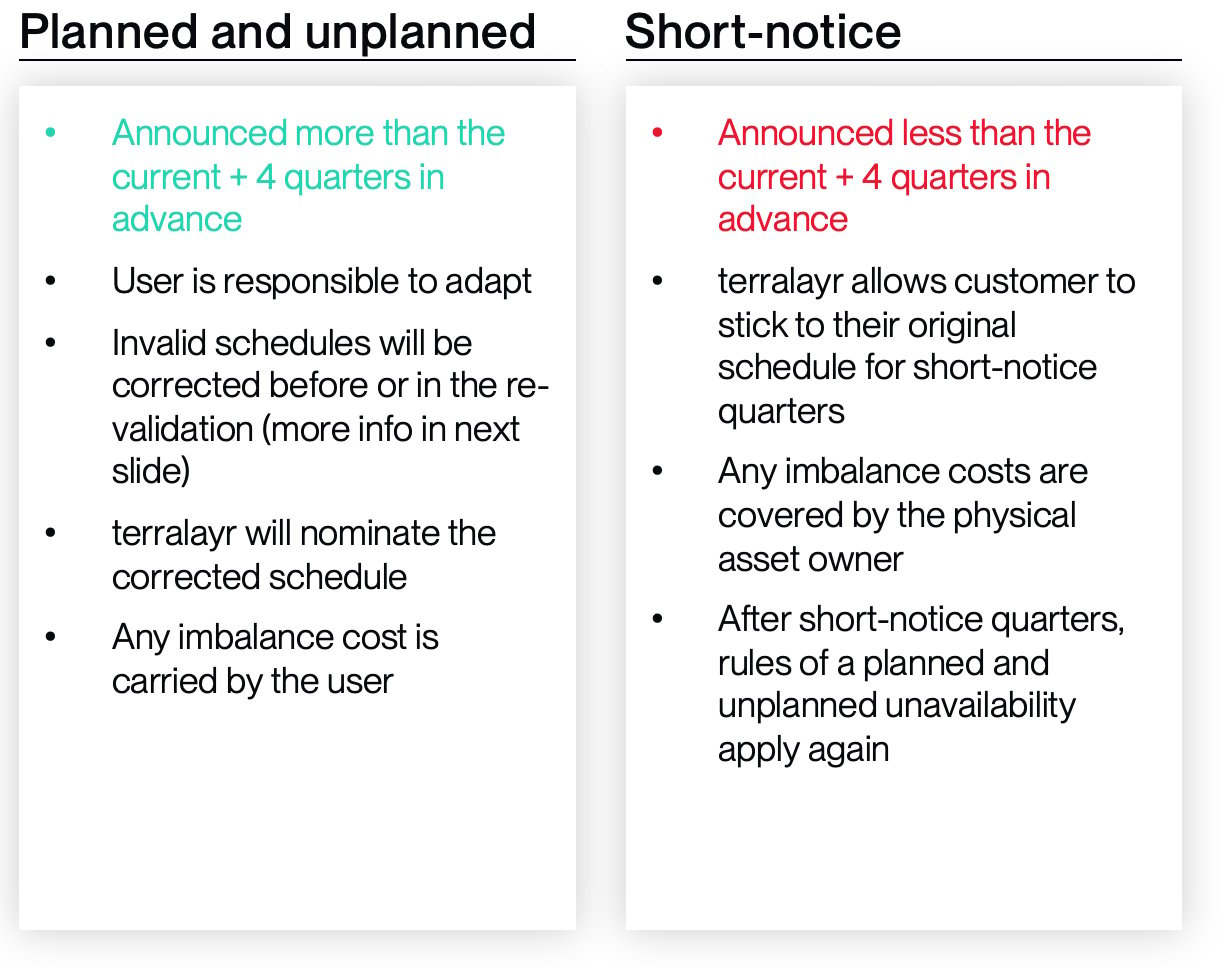
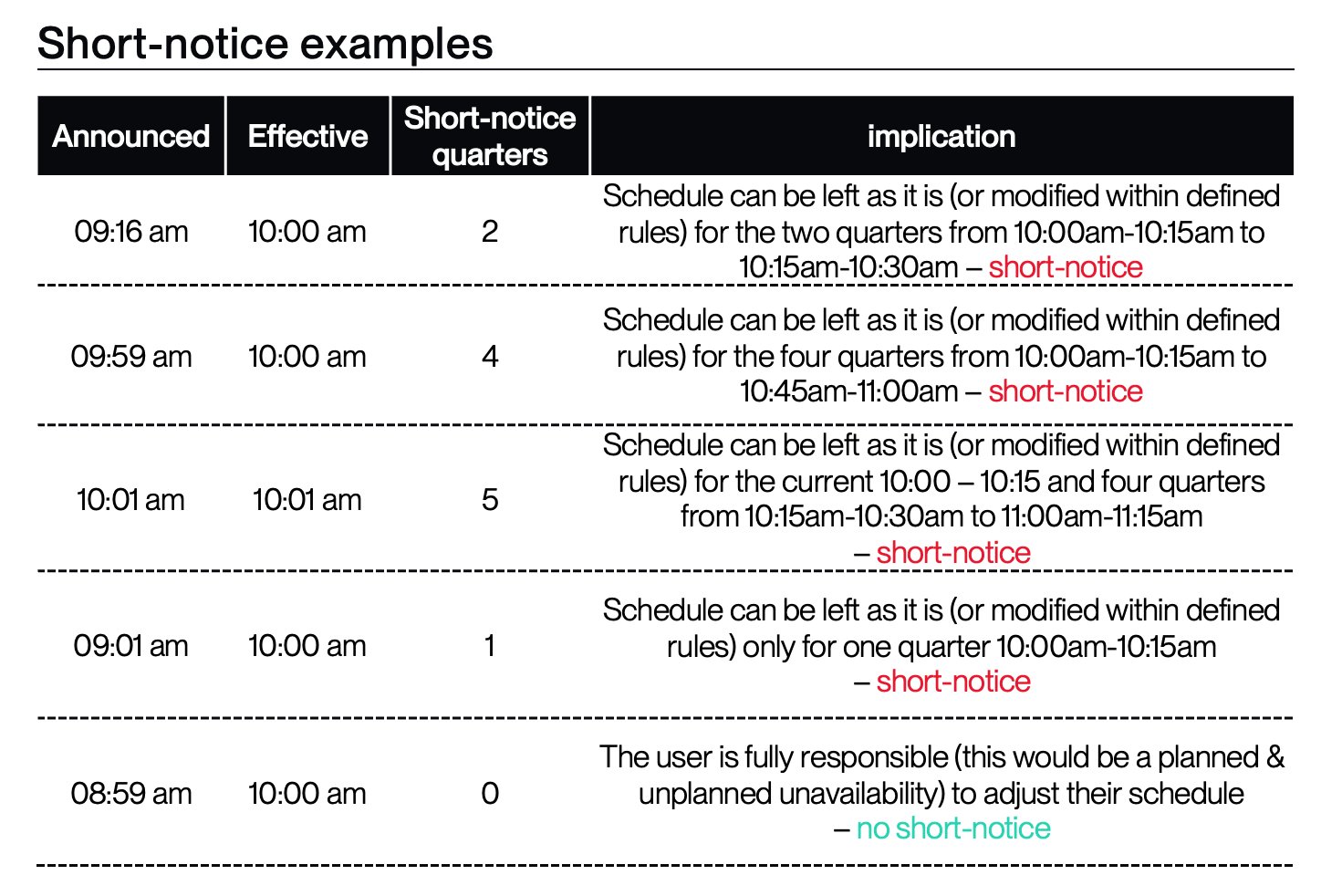
- The announcement is less than four quarters in advance to the quarter they go into effect = short-notice unavailability
- The announcement is more than four quarters in advance to the quarter they go into effect = planned & unplanned unavailability
- These include planned unavailabilities (i.e. maintenances)
- And unplanned unavailabilities which however do not hit “short-notice”
Different implications
Implications and cost distribution: planned & unplanned unavailability
- the planned & unplanned unavailability is announced with enough “buffer time” to allow a virtual asset user to still adjust their schedule and close their positions in order to ensure that physical delivery of the schedule is feasible
- If the user fails to do so, the schedule will be corrected in the re-validation step ( 2. Schedule validation, re-validation and corrections - [work in progress, will be released soon]
- terralayr will nominate the corrected schedule. Thus any imbalance caused by the deviation between the nominations (corrected schedules) and the scheduled trades of the virtual asset user are carried by the user
Implications and cost distribution: short-notice unavailability
- the short-notice unavailability is not announced with enough “buffer time” to allow a virtual asset user to still adjust their schedule and close their positions in order to ensure physical delivery of the schedule is possible
- terralayr allows customer to stick to their original schedule (exact dynamics explained later Rules for your schedule in quarters where announcement is less than four quarters before unavailability going into place ) for the current quarter and four further quarters of lead-time between announcement and the first required correction
- Exact rules for the behaviour of your virtual asset and the financial implications during short-notice affected quarters are covered in Rules for your schedule in quarters where announcement is less than four quarters before unavailability going into place
- any costs which result from sticking to the original (or modified by the customer within the allowed range) schedule are covered by the physical asset owner
- the exact implications on your schedule, how you can still modify it are be described in Unavailability impact on wholesale block - short-notice unavailability
- After the current + four quarters have passed, you face a planned & unplanned unavailability again! That means it is your responsibility to make sure your schedule is physically deliverable again
Examples
5. Changes in usable Power and Energy capacity - for partial unavailabilities
The following part will briefly describe how the relevant endpoints of your virtual asset will change if an unavailability hits.Unavailability impact on wholesale block - planned & unplanned unavailability - status Q3 2025
→ unavailabilities affect your Wholesale Block. Both power capacities (powerCapacityChargeAvailable, powerCapacityDischargeAvailable) and the energy capacity (energyCapacityAvailable) can be partially or fully curtailed due to an outage.
Change in Power Capacity
The following relevant parameters of your virtual asset related to power capacity can reducepowerCapacityChargeAvailablepowerCapacityDischargeAvailable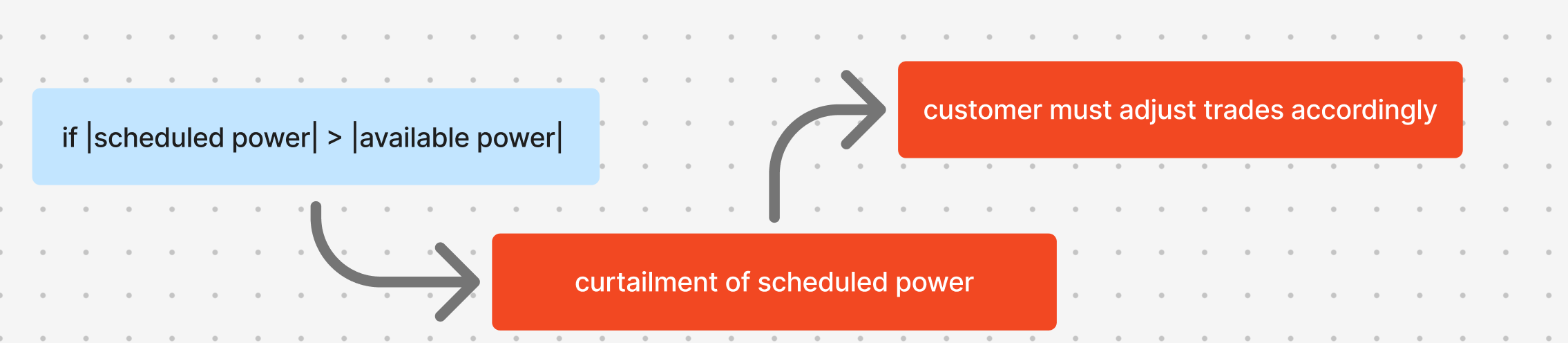
- your scheduled power will be actively curtailed by the platform, if it is not anymore deliverable after an unavailability
- you have to adjust your trades accordingly
- Once curtailed, the scheduled power will stay curtailed (even if the unavailability ends earlier as planned!)
- if the unavailability ends earlier as planned, the trader can increase the scheduled power again, according to the new availability
Change in Energy Capacity
If an outage occurs, the overall available energy storage capacityenergyCapacityAvailable of your virtual asset can reduce

- during the time in which Energy capacity available is reduced, we scale the actual SoC in the same ratio as we reduce the available energy capacity
- that means your SoC stays the same on the virtual asset
- and you have some “frozen” SoC in the unavailable part of the virtual asset left
- that “frozen” SoC will get released after the unavailability is lifted → which means there will be a jump in SoC depending on the delta between new SoC at end of unavailability in the still available share of the asset and the old “frozen” SoC
- your scheduled power will not be actively curtailed by the platform, if it leads to the SoC getting out of bounds → the SoC might get out of bounds as a result of reduced power during a certain time-period (which leads to less SoC than originally planned) and then power back at the un-curtailed level as soon as the unavailability is over (which leads to a counter-directional SoC movement but from a different SoC starting point than originally planned) → we will show different scenarios of this in the following part
- you are responsible to make sure that the adjusted schedule does not lead to SoC levels which are out of bounds!
Change in SoC boundaries
The operational State of Charge (SoC) bounds of your virtual asset stay the same relative to your available Energy capacitysocBoundsLower: During an unavailability, the lower SoC bound would stay the same in relative terms, but decrease in absolute termssocBoundsUpper: During an unavailability, the upper SoC bound would stay the same in relative terms, but decrease in absolute terms
Examples
- We provide exemplary guidance based on the web app interface.
- We set up a virtual asset with:
powerCapacityChargeAvailable= 10MWpowerCapacityDischargeAvailable= 10MWenergyCapacityAvailable= ****20MWhsocBoundsUpper= 100%socBoundsLower= 0%
- You can see the virtual asset with its respective schedule below
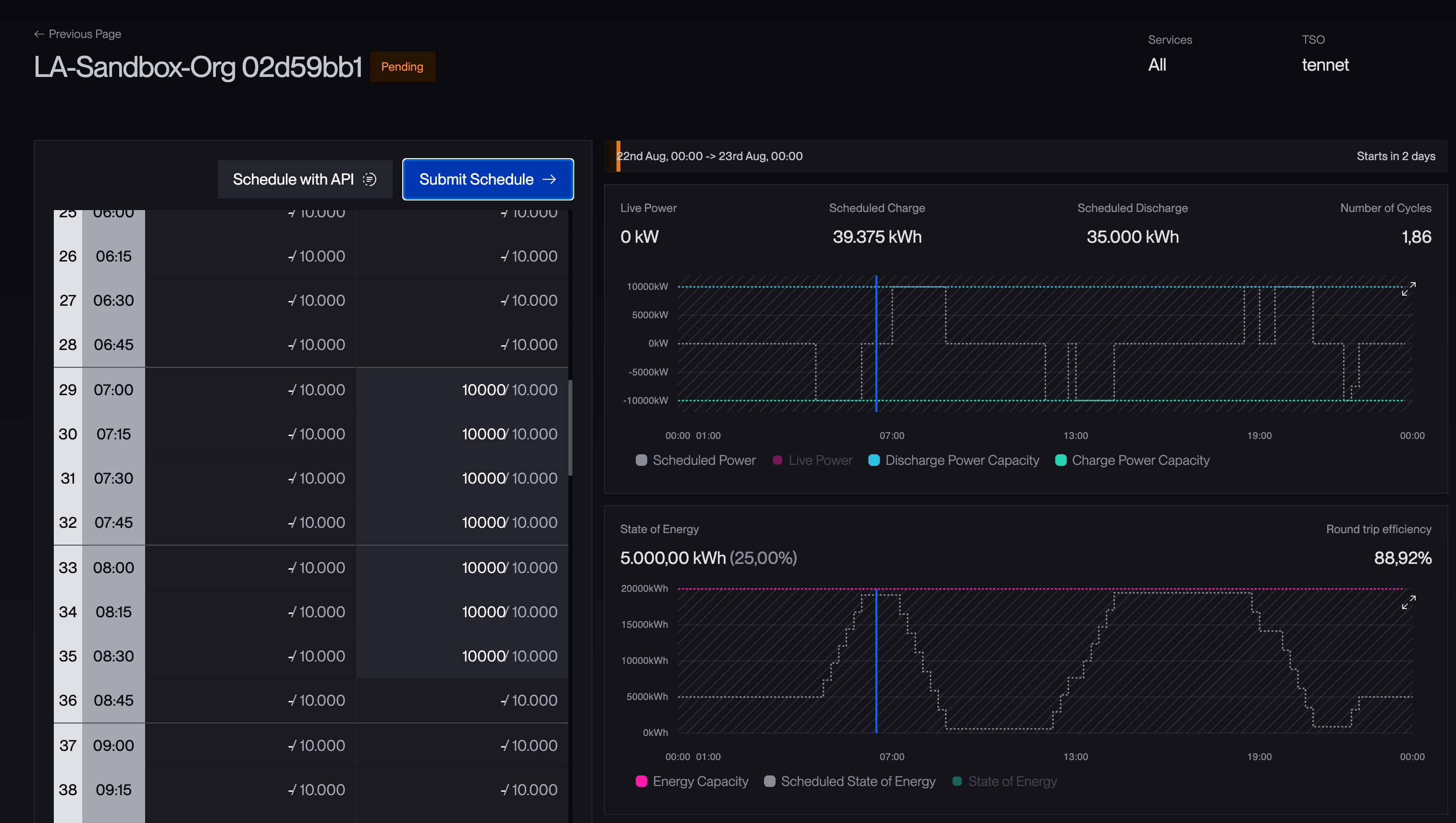
- we are first checking the impact of a scheduled hardware maintenance with 25% remaining availability for Power capacity and Energy capacity from 8am - 11am

- effect:
- as power and energy unavailability are coming in at the same ratio, during the unavailability available power and energy capacity values are reduced as one would expect
- as mentioned before, the power reduction is a hard intervention in the schedule
- however, there is still a need for intervention!!
- the SoC jump after the “frozen” SoC get released after the unavailabilty ended leads to a higher starting SoC than orignally expected
- this eventually causes an SoC out of bounds event around 14:00 which is not prevented by the platform!!
- the user on the virtual asset is obligated to re-adjust their schedule to prevent such an event
- furthermore, the user should adjust trades accordingly
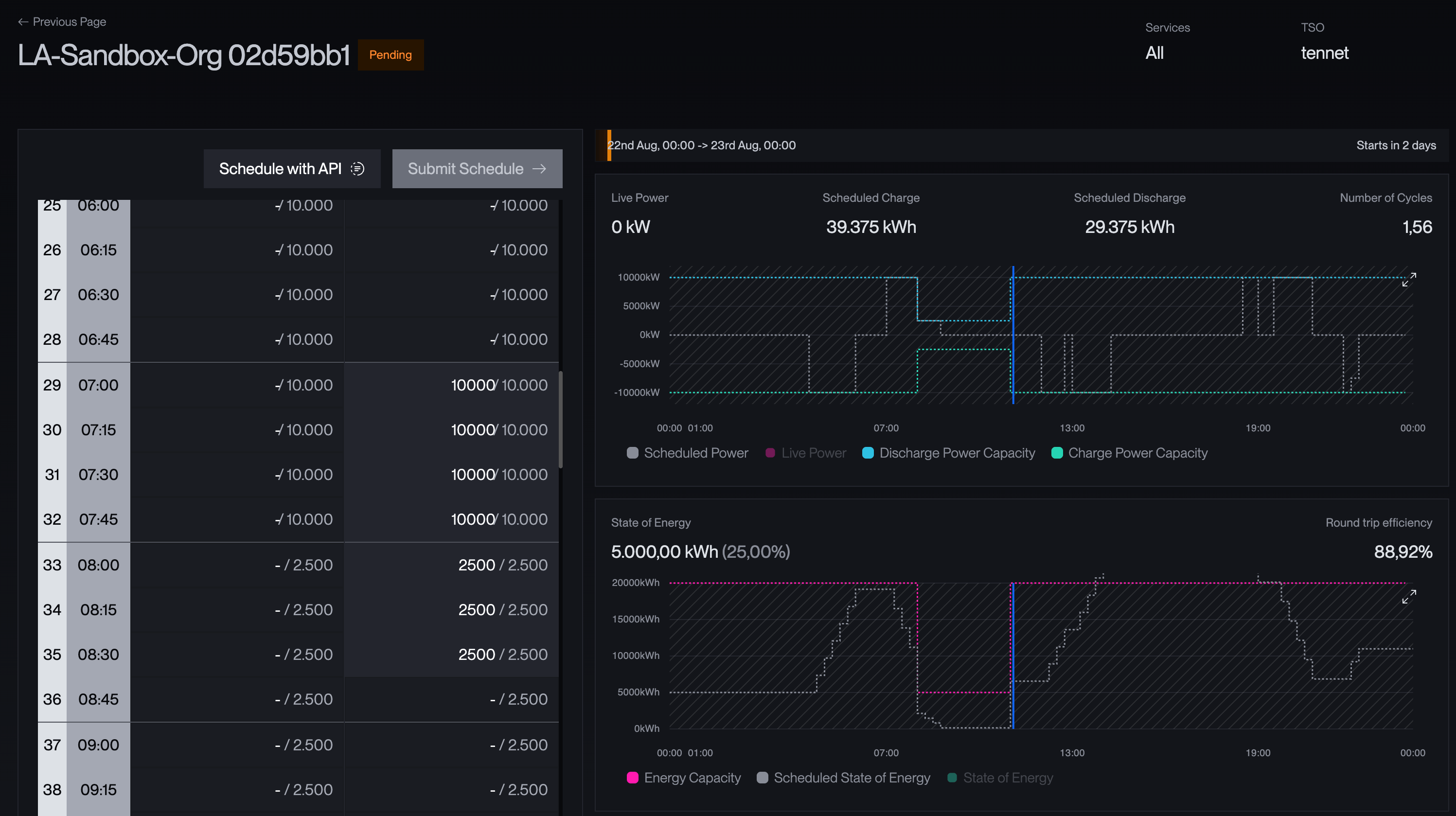
- secondly, we are checking the impact of a scheduled hardware maintenance with 25% remaining availability for only the Energy capacity from 8am - 11am

- effect:
- as the power capacity remains untouched, it drives the virtual asset into an out of bounds situation relatively fast (we still have the same power scheduled but only 5MWh left as
energyCapacityAvailableinstead of 20MWh originally) - this eventually causes an SoC out of bounds event around 08:00 which is not prevented by the platform!!
- the user on the virtual asset is obligated to readjust their schedule to prevent such an event
- furthermore, the user should adjust trades accordingly
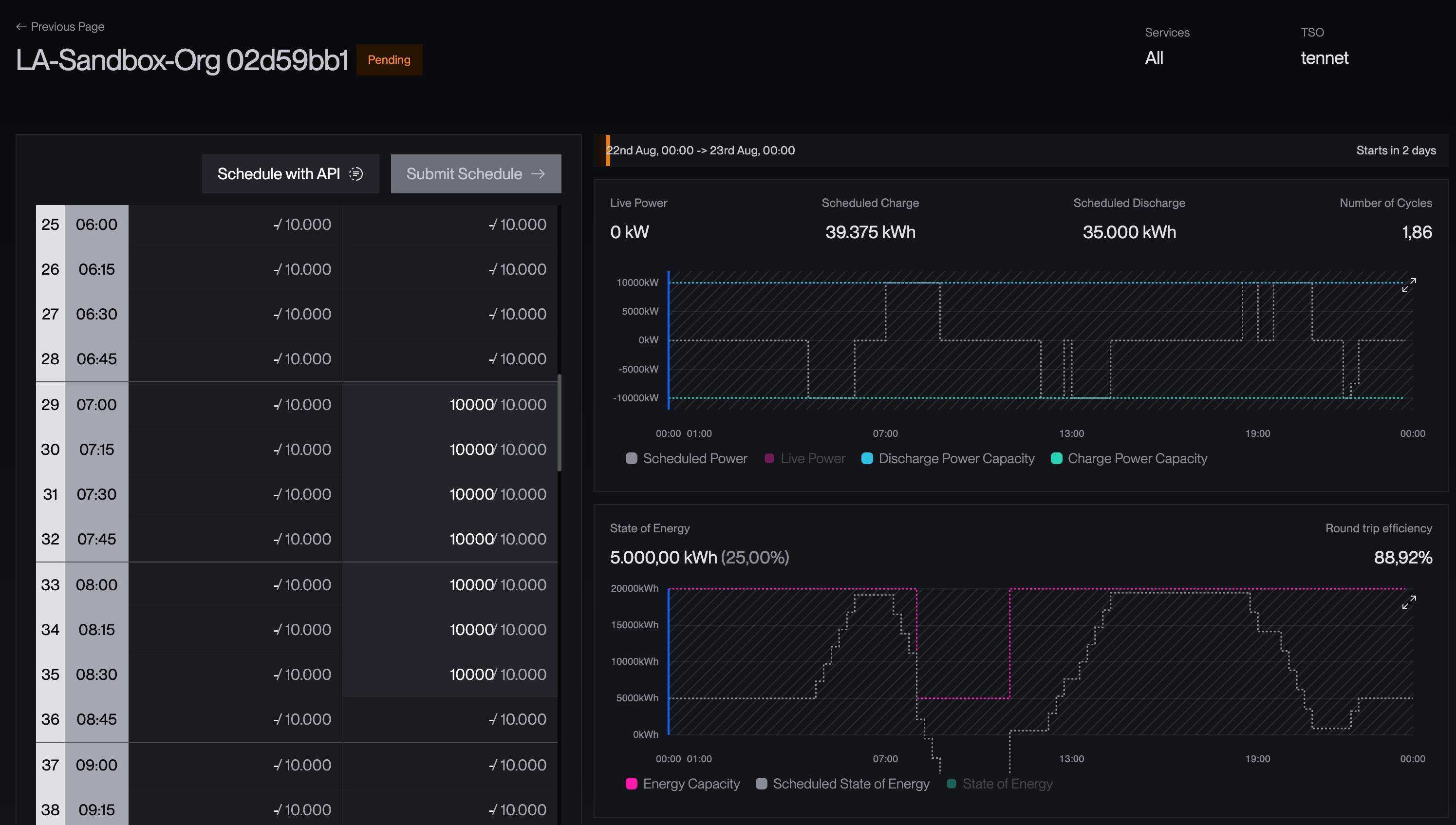
- as the power capacity remains untouched, it drives the virtual asset into an out of bounds situation relatively fast (we still have the same power scheduled but only 5MWh left as
- thirdly, we are checking the impact of a scheduled hardware maintenance with 25% remaining availability for only the Power capacity from 8am - 11am

- effect:
- as the energy capacity remains untouched, and power capacity gets curtailed automatically by the platform, there is no need for intervention at first
- however, the SoC after the unavailability is higher than originally scheduled, because there was less discharge
- this eventually causes an SoC out of bounds event around 14:00 which is not prevented by the platform!!
- the user on the virtual asset is obligated to readjust their schedule to prevent such an event
- furthermore, the user should adjust trades accordingly
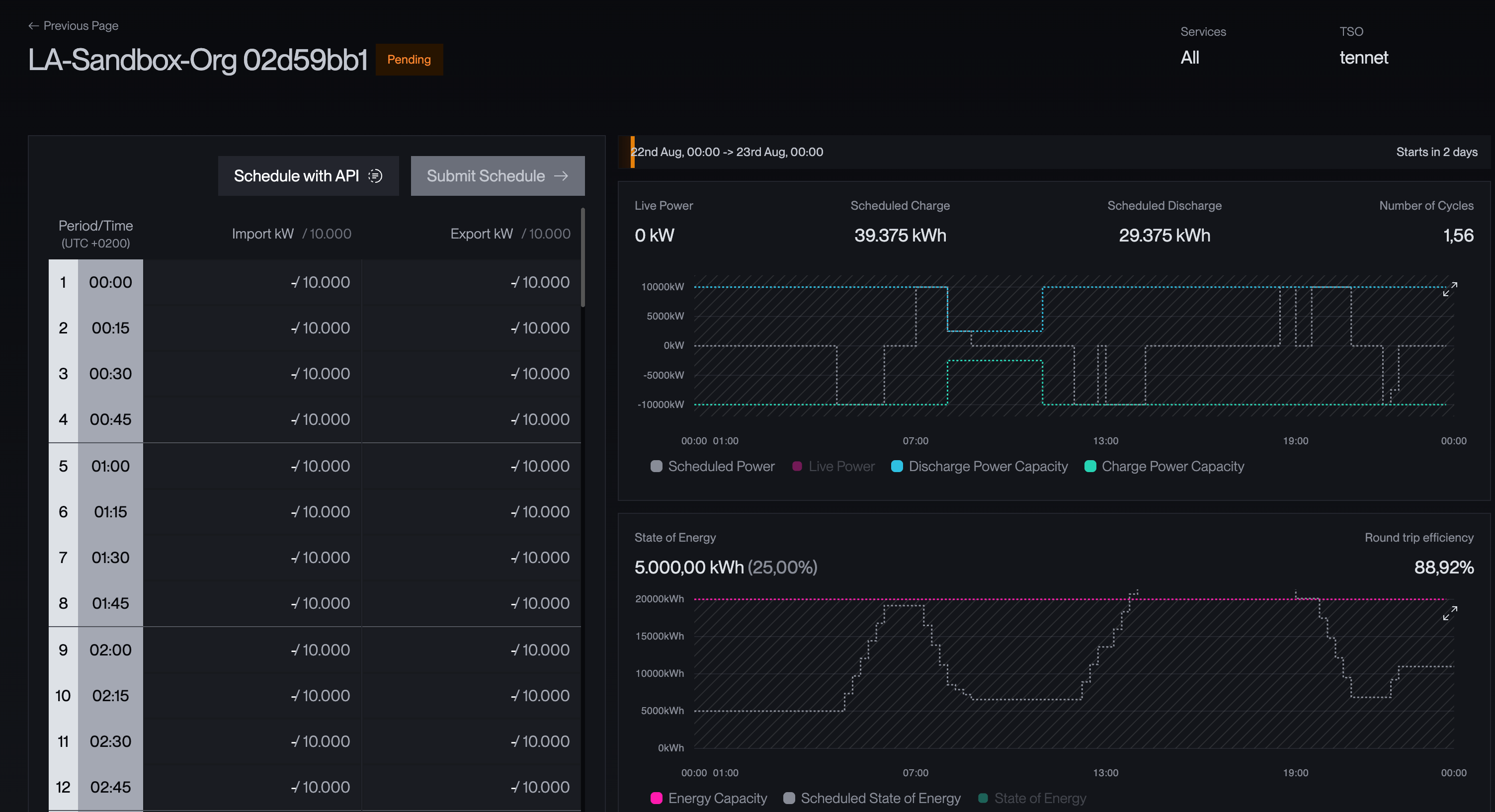
Unavailability impact on wholesale block - planned & unplanned unavailability
- introduction of schedule re-validation
- feedback on the virtual asset 7 minutes before dispatch, on whether the next scheduled dispatch will bring the battery out of bounds
- corrective actions to the scheduled dispatch
- e.g. a schedule which would lead to an out of bounds SoC would be flagged and corrected within the schedule re-validation step
- that means if your schedule would violate SoC boundaries, corrective measures will be applied to respect the physical boundaries of your virtual asset
- notification system
- you can optionally chose to get notified if an unavailability has been put into the system
Unavailability impact on wholesale block - short-notice unavailability
The following part will explain the exact implications of a short-notice unavailability on your schedule and also walk you through the financial implications in terms of imbalance costs.- We first talk about rules that apply to quarters where announcement is less than four quarters before unavailability going into place
- We then cover rules that apply to quarters where announcement is more than four quarters before unavailability going into place
- As outlined before, short-notice unavailabilities are subject to slightly different rules than planned & unplanned unavailabilities
- We recall that they are defined as being announced less than 4 quarters in advance to the quarter they go into effect
- We will call them short-notice affected quarters in the following
- The most extreme case would be, that they are announced in the moment in which they go into effect
Rules for your schedule in quarters where announcement is less than four quarters before unavailability going into place
For ease of understanding, we will stick to the most extreme example of an unavailability which is announced without any buffer time Important requirement:- You schedule at least the current and four further quarters in advance on the virtual asset
- This schedule can constantly change, but it serves as a log between the platform and the user to agree on what “has been scheduled” in the moment in which the unavailability was announced → if you do not communicate your schedule four further quarters in advance, terralayr does not know what you intended to dispatch at the moment of unavailability announcement, because there is no mutually agreed log of the schedule! In this case a scheduled power of 0 would be assumed!
- For each of the (plus maximum of four quarters after the current) short-notice affected quarters within the timeframe of an short-notice unavailability, you can either
- Leave the scheduled power as planned
- Reduce power within the range of
- Max: originally scheduled power in absolute terms or still remaining power after unavailability
- If you schedule a value which is below the originally scheduled power in absolute terms but above the still remaining power after unavailability → this will be your new upper power limit → there is a non-reversable downwards “trailing” behaviour in the upper limit of power, until you have reached the still remaining power after unavailability
- Min: still remaining power after unavailability (in counter-direction)
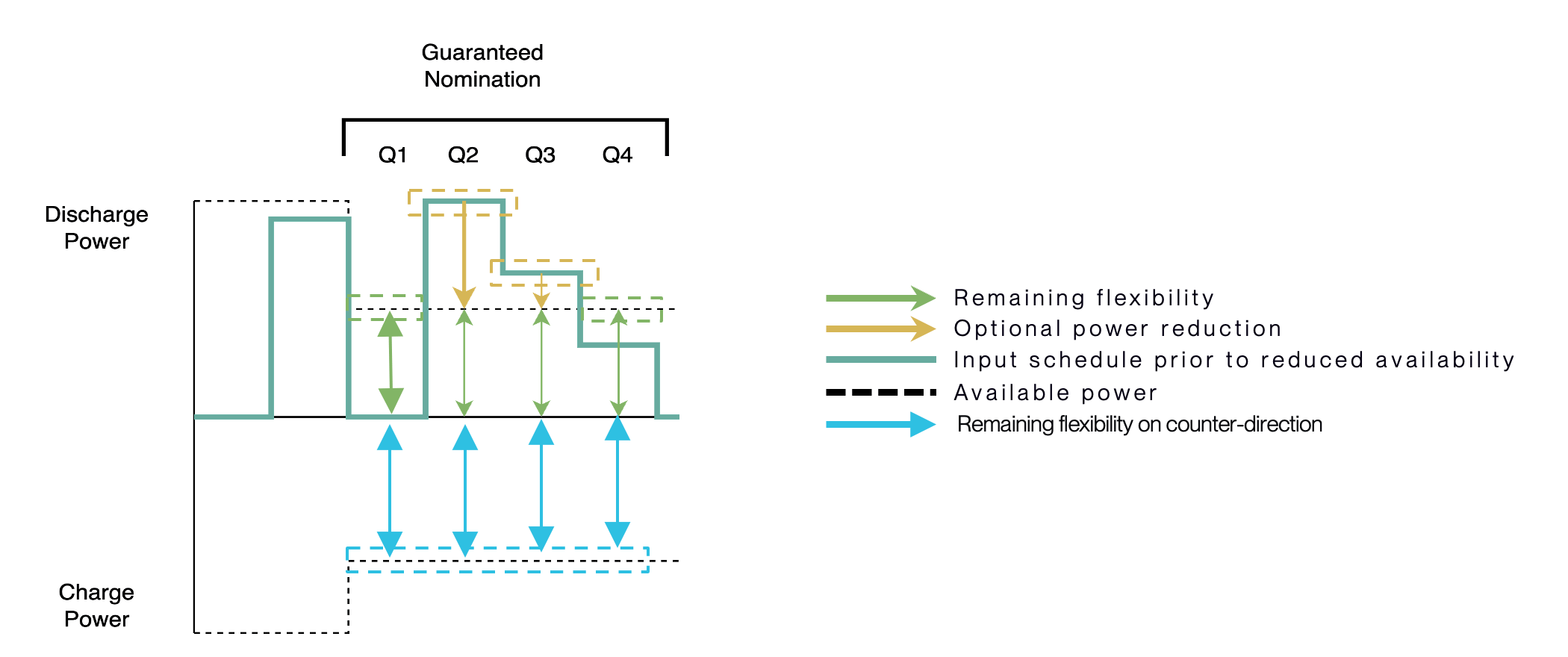
- Max: originally scheduled power in absolute terms or still remaining power after unavailability
- These two boundaries are the range of max power available now. If you attempt to schedule a power which exceeds one of the two limits, your schedule would get rejected according to reasons for invalid schedules
→ Despite not being physically deliverable, terralayr does not correct your schedule four the short-notice affected quarters! → terralayr will nominate your schedule → Any costs resulting from this such as imbalances costs, will be carried by the asset owner → terralayr ensures that the SoC of the virtual asset changes according to the nominations of the first four quarters. Energy you own is still yours. → That also means, as long as above defined rules are followed, short-notice affected quarters would not fall into the reasons for schedule rejection Example: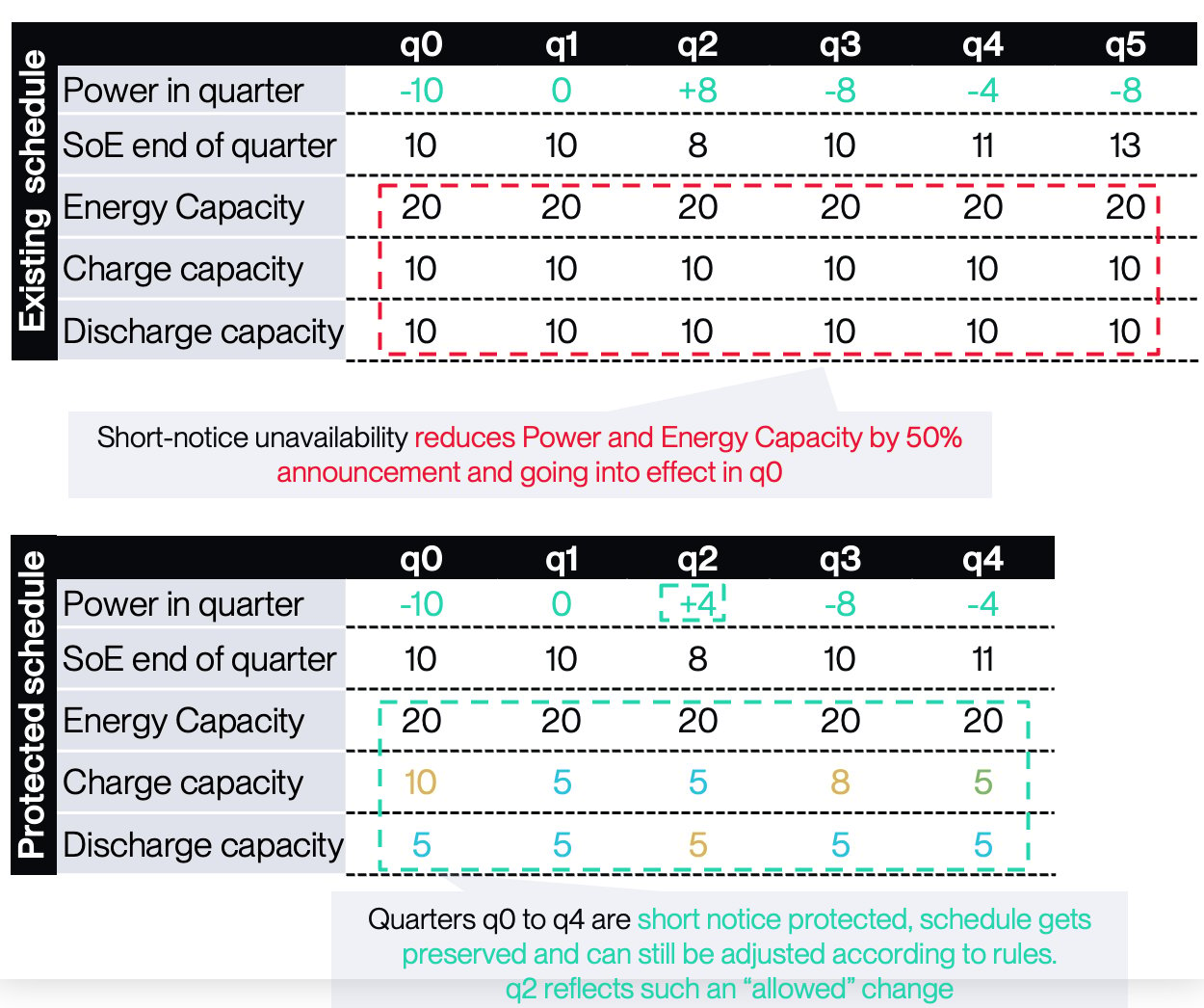
- The “short notice” power limits which might exceed the real power values are not communicated via API
- It is obligation of the user to implement these rules, if they want to navigate within the permitted range of power
- The API will contain the power limits already subject to unavailability
- However, the protected schedule is not subject anymore to any kind of validation, and will be nominated by terralayr, as long as the schedule and potential changes are in line with Rules for quarters which count as short-notice affected
Behaviour of Energy capacity during short-notice quarters
- Energy capacity behaves slightly different in short notice unavailabilities than the power schedule
- There are some main guiding principles which the Energy capacity and the state of Energy follow
- All energy you buy or sell during short-notice unavailability quarters will be stored and will be available to you after unavailability end (=frozen energy)
- However, you will only be able to access the energy which is allocate to your available virtual asset during the unavailability
- We distribute Energy charge or discharge to your remaining available and virtual battery in equal share of its availability
- The rest is allocated to your unavailable share (=frozen energy)
- More detailed explanation in the example Example 1.1 SoE behaviour in short-notice unavailability - at maximum power (this case covers contractually agreed on 4 short notice quarters)
- Changes during short notice quarters
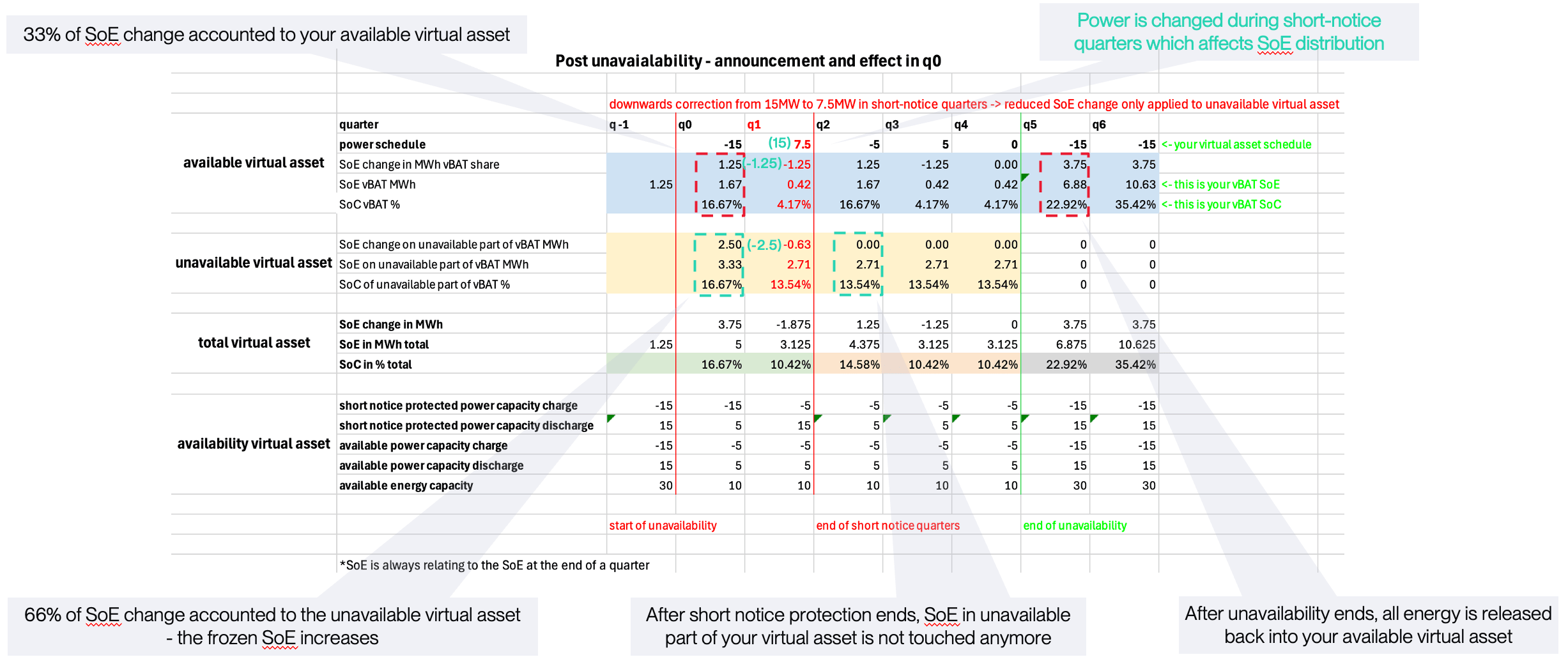
- If you change power during short notice periods, that reduction in SoE change is only applied to the unavailable share (=frozen energy)
- Example 1.3 covers this behaviour
- That means your scheduled power values do not perfectly translate into State of Energy changes on your available virtual battery, because a share of the power also translates into State of Energy changes on the unavailable virtual battery
- You won’t be able to access the energy in your unavailable virtual battery part (=frozen energy) during or after short-notice and the subsequent normal unavailability quarters
- The energy in your unavailable virtual battery part is stored, but frozen, until the unavailability ends
- Setup for the unavailability
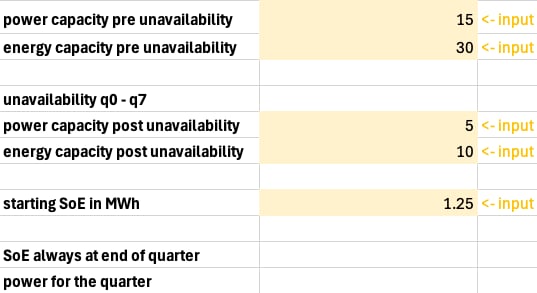
- Schedule before unavailability

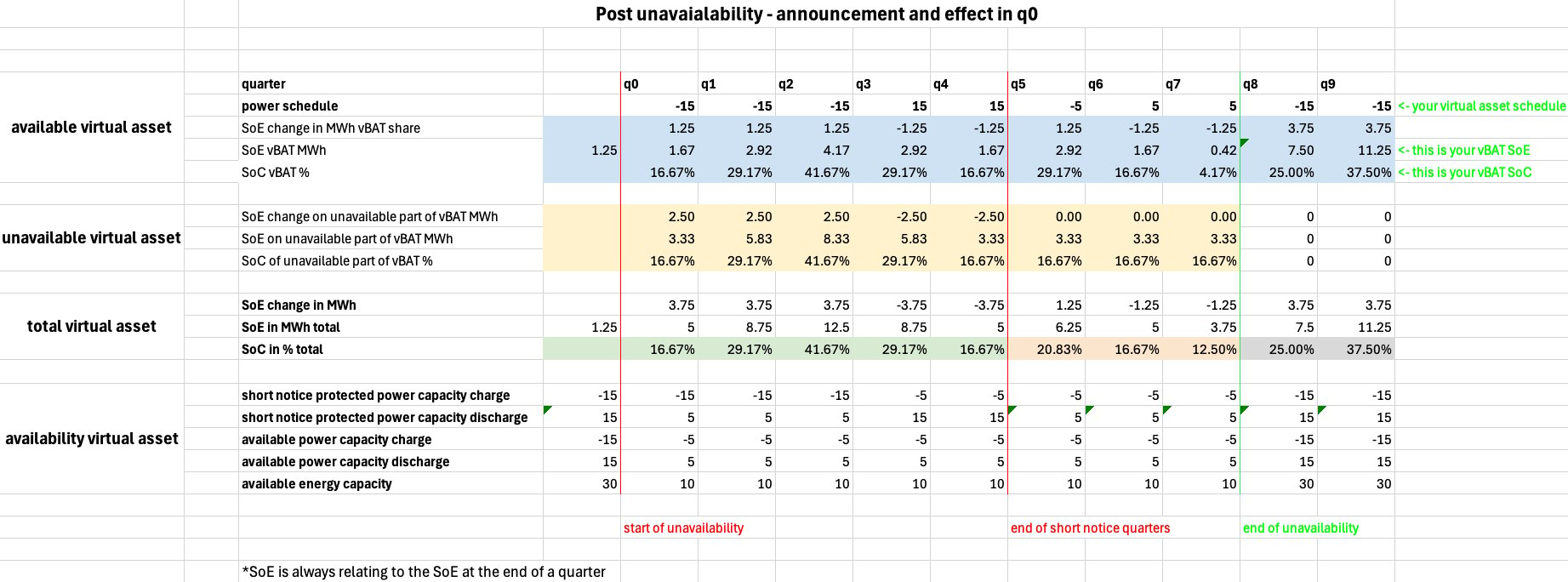
- Schedule after unavailability
- you can observe how your total virtual asset is split into an unavailable virtual asset and an available virtual asset
- your initial schedule remains untouched, but the respective SoE changes are divided into the unavailable virtual asset SoE and the available virtual asset SoE in respective shares
- until the unavailability ends, the Energy stored in the unavailable virtual asset is not accessable, but stored safely (=frozen energy)
- After the unavailability ends, the unavailable virtual asset SoE (=frozen energy) and the available virtual asset SoE are aggregated again and you can access all the Energy you have traded over the former quarters
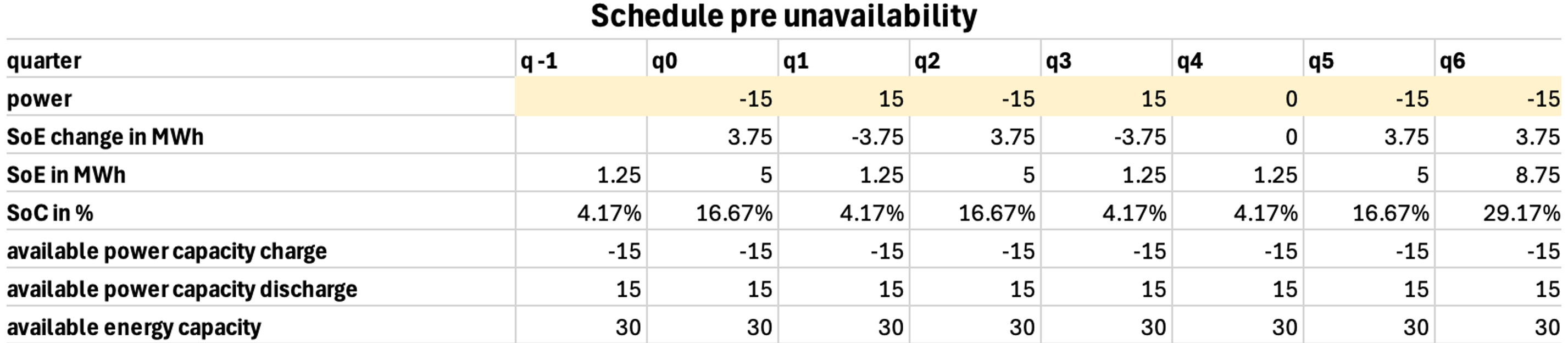
- Schedule before unavailability
- Schedule after unavailability
- you can observe that the energy changes during unavailability are distributed in proportional shares to the available and unavailable part of the virtual asset
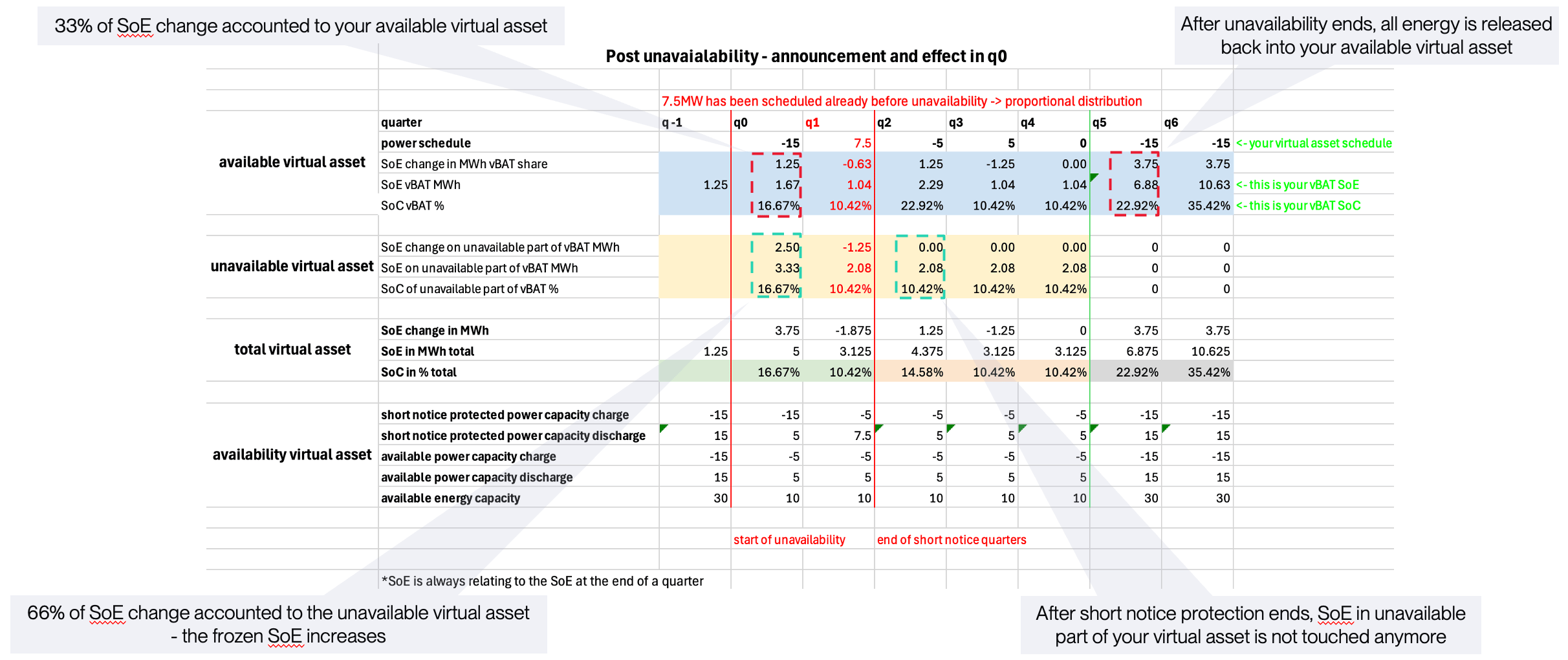
- you can observe that the energy changes during unavailability are distributed in proportional shares to the available and unavailable part of the virtual asset
- Schedule before unavailability
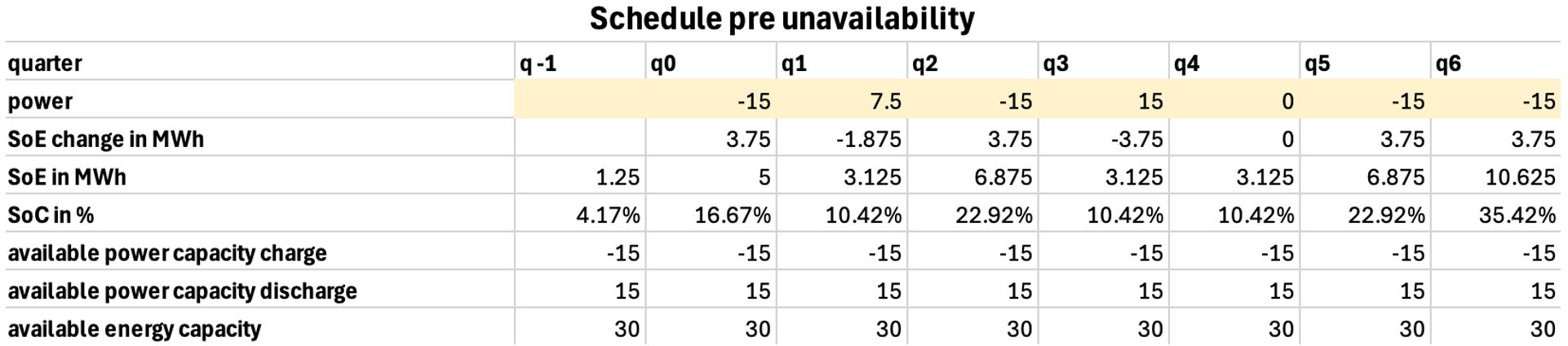
- Schedule after unavailability
- the short-notice protected reduction in power translates to a smaller change in Energy during q2 → this reduction is only applied to the unavailable virtual asset
- the energy change on the virtual is staying the same in this example, and is generally only touched after the unavailable asset
Rules for your schedule in quarters where announcement is more than four quarters before unavailability going into place
- For the quarters which come after the short-notice affected quarters, the normal rules from apply again!
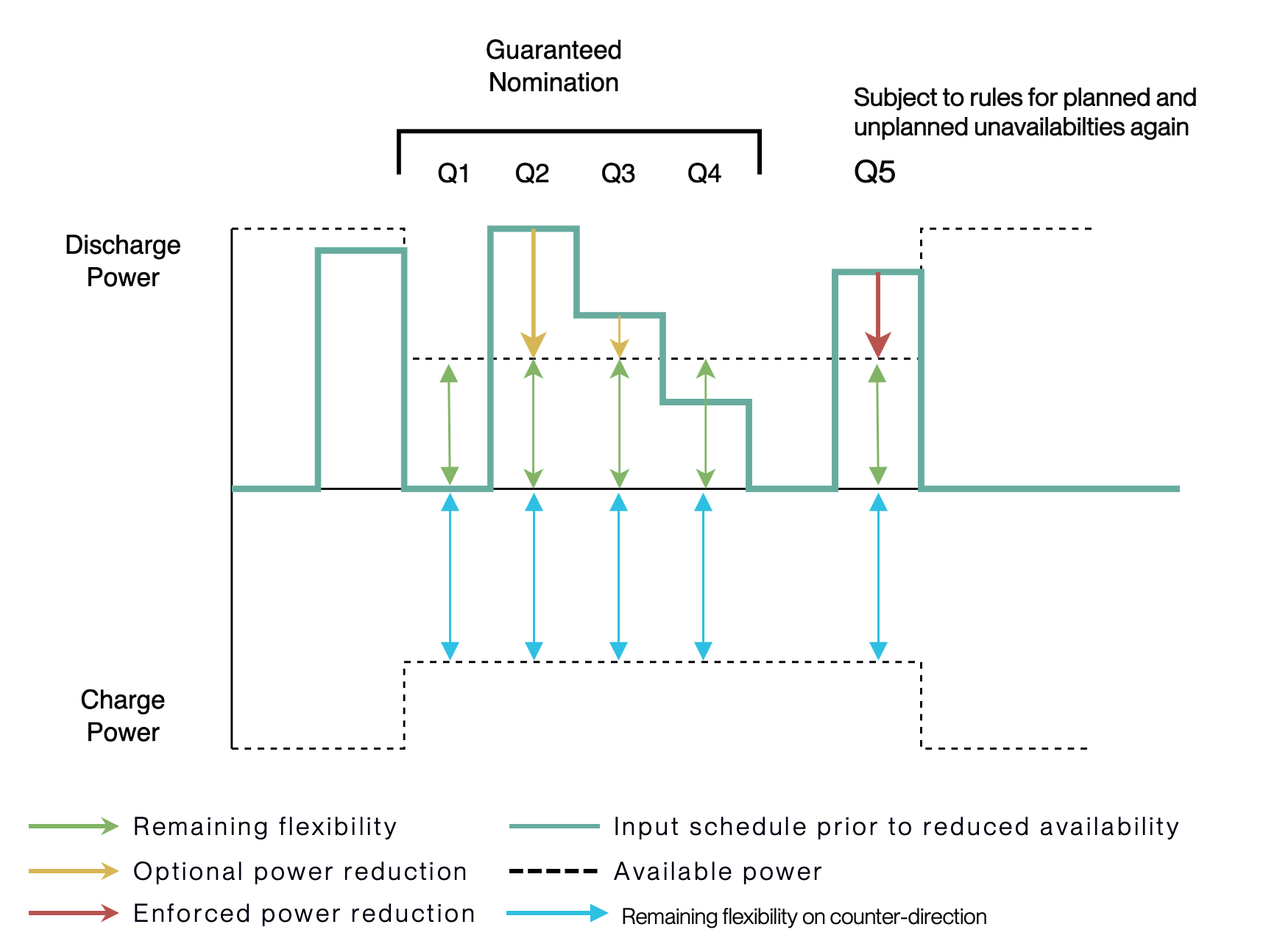
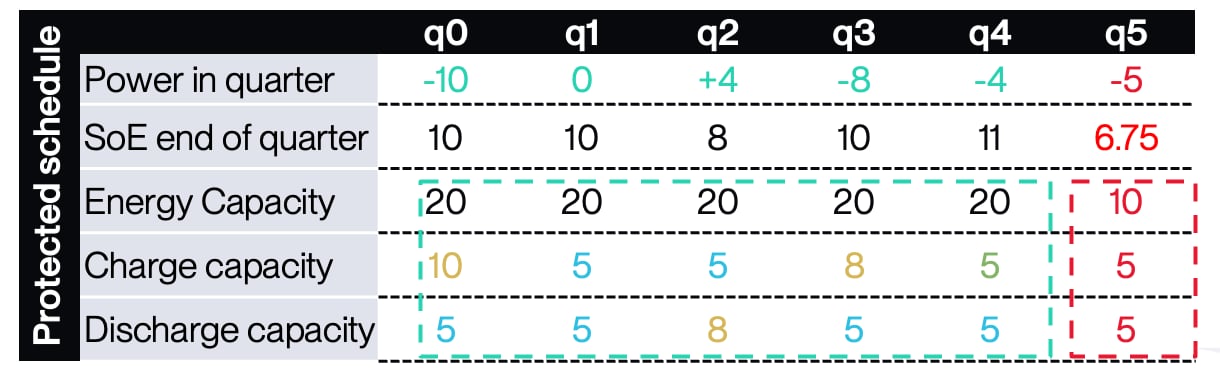
- As you can see, for the first quarter (Q5) after the short-notice affected quarters
- terralayr will correct your schedule to be physically deliverable (=enforced power reduction)
- terralayr will nominate the corrected schedule
The concept of frozen energy and how to correctly project SoE
We already mentioned the concept of frozen energy quite frequently. Frozen energy is the part of your SoE which is put aside safely during an unavailability. As also outlined before there are two rules which apply to your SoE- In short-notice quarters, rules apply as pointed out in Behaviour of Energy capacity during short-notice quarters
- If an unavailability is announced early enough to not fall into the short-notice regime, the SoE is split according to the impact of the unavailability (the % of unavailable energy capacity is applied to the SoE and safely put aside as frozen energy)
How to correctly project SoE during and after unavailabilities
While terralayr provides an SoE projection based on submitted schedules, we understand that customers also need internal SoE projections; for example to model SoE impact of multiple trading scenarios and their respective unsubmitted schedules. The following part will briefly give a suggestion on how to model projected SoE which correctly takes into account unavailabilities.- Energy capacity condition:
- Either use stateOfEnergyBoundsUpper or multiply the energyCapacityAvailable and stateOfChargeBoundsUpper (leads to the same value) from
- Either use stateOfEnergyBoundsUpper or multiply the energyCapacityAvailable and stateOfChargeBoundsUpper (leads to the same value) from
- State of Energy projection
- Starting point for SoE by taking stateOfEnergy from
- Starting point for SoE by taking stateOfEnergy from
- Frozen energy projection
- To get a realistic SoE projection, you would need to get the frozenEnergyProjection from
and deduct it of your internal total energy projection

- To get a realistic SoE projection, you would need to get the frozenEnergyProjection from
- Your inhouse schedule and efficiency
- you can then apply your inhouse scheduled power projection including efficiency to the inhouse SoE projection Important note: the frozen energy projection can differ over time! It is not enough to only apply it once - you have to check for differences and take those into account in your SoE projection calculation
Example calculation
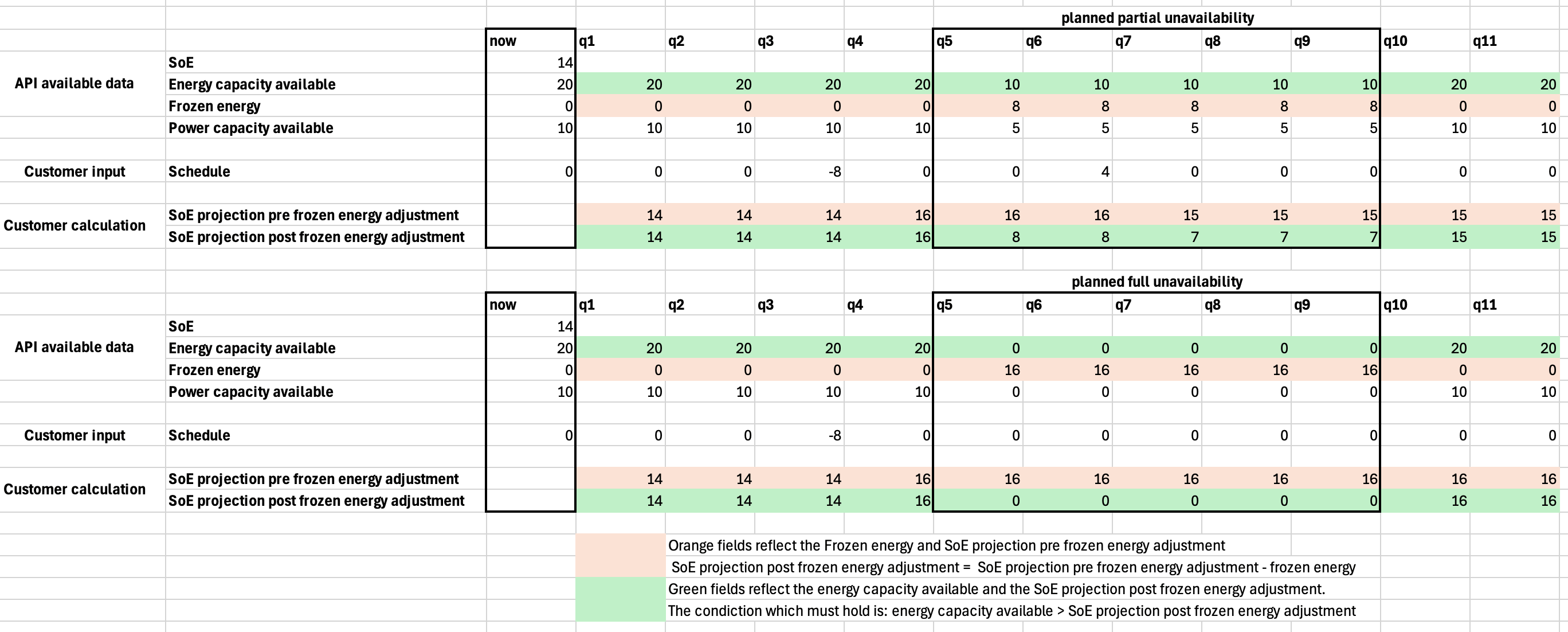
The following part briefly walks through two examples for how a user can calculate SoE projections based on data provided by terralayr. We briefly describe the most important datapoints and how they can be calculated. Then we provide the screenshots and also attach the excel file for easy interpretation. This is not the only way to implement, you can treat it as a potential option.- Frozen energy:
- SoE before unavailability * (unavailable rated energy capacity / total rated energy capacity)
- SoE projection pre frozen energy adjustment
- SoE or SoE projection pre frozen energy adjustment of previous period + (power/4) (for simplicity we assume efficiency of 1)
- SoE projection post frozen energy adjustment
- SoE projection pre frozen energy adjustment - frozen energy
- SoE projection post frozen energy adjustment < energy capacity available
6. How to test in Sandbox
Easiest way: use the webapp
You can just use the webapp to schedule some discharge profiles- Step 1: Log-in
- Step 2: Check in with terralayr to get virtual assets assigned, if you don’t yet have them
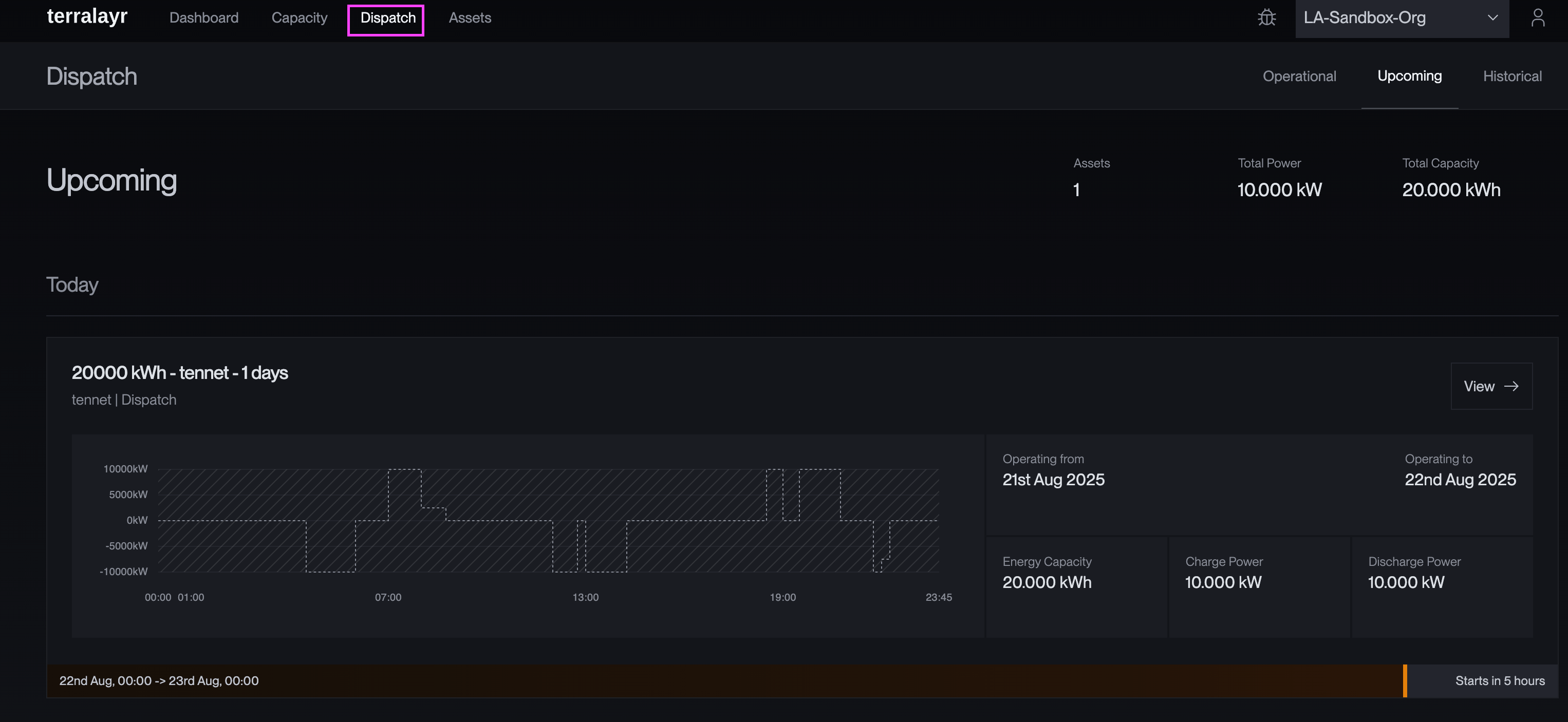
- Step 3: Navigate to the Dispatch and upcoming part of the webapp
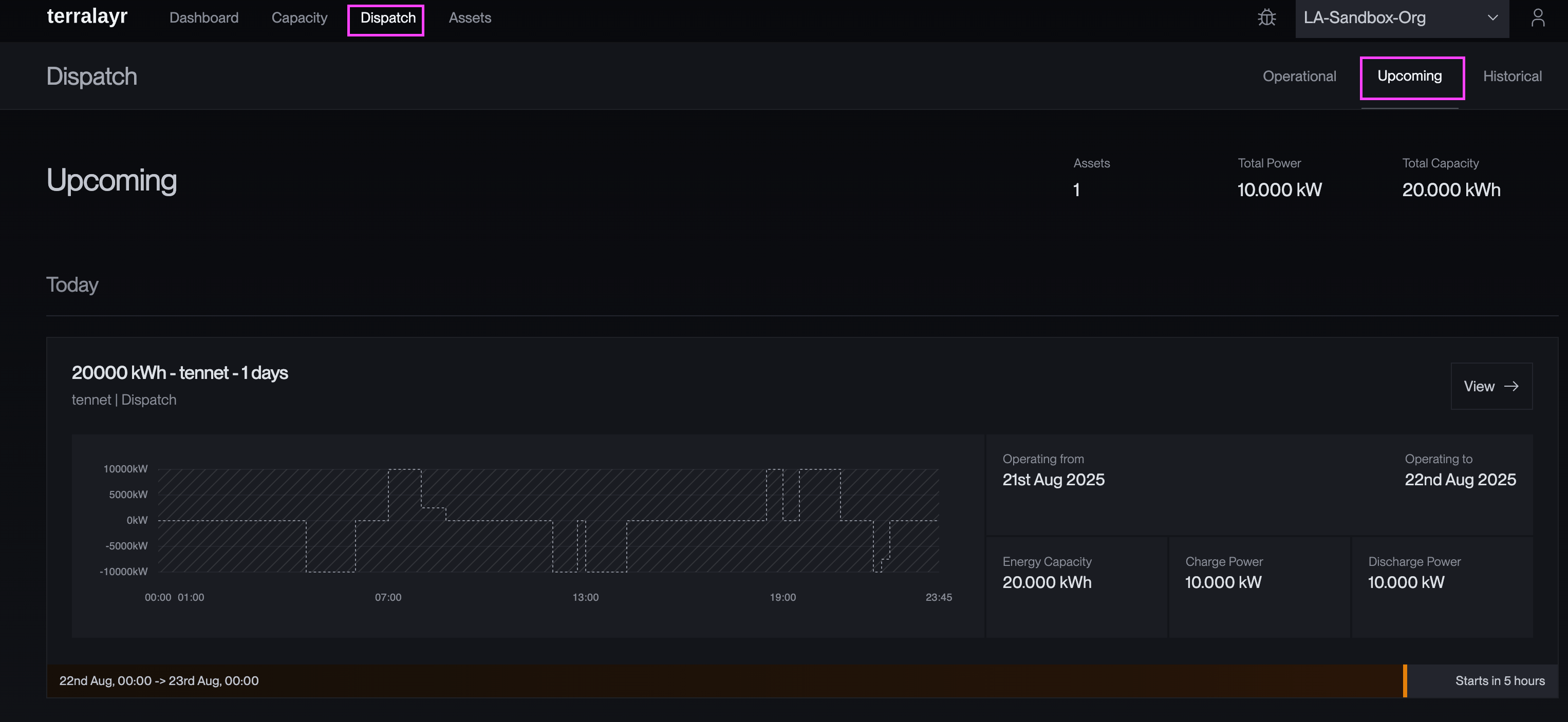
- Step 4: View your virtual asset
- Step 5: Submit a schedule
- Step 6: If you want to see the impact of unavailabilities on your schedule - ask terralayr and we will set them up accordingly