This guide explains how to participate in ancillary service markets at the virtual asset level: which markets you can bid into, which endpoints to implement, how much you can bid, and how bids, results, commitments and activations behave over time.
1. What are ancillary services?
Ancillary services are a set of markets that are critical for the moment-to-moment balancing of the grid at a stable frequency, voltage and power load to guarantee a reliable power supply. Stabilizing the grid via ancillary services is done by the Transmission Grid Operators (TSO).
Bidding into ancillary services is equivalent to offering a certain amount of your available power capacity to the TSO which it can use to balance the grid. This is done via activation signals that are sent by the TSO to a physical asset that has placed a successful ancillary bid. These activation signals have a positive (discharge) or negative (charge) direction as well as a power capacity and must immediately be carried out by the physical asset that receives them.
2. Which ancillary markets can I bid into?
Via our API, you can participate in three ancillary markets that all come with individual product names, bidding deadlines and requirements:
2.1 FCR
FCR (Frequency Containment Reserve) is the primary reserve which is activated as a first response to frequency disturbances. It is traded in six 4-hour EFA Blocks that span the entire day.
2.1.1 Product names and product direction
The product name of an FCR bid consists of the product direction and the EFA block for which the bid is submitted.
Since FCR bids are bi-directional, they always have the product direction NEGPOS. That means the capacity offered via an FCR bid can be requested as a positive (discharge) or negative (charge) activation by the TSO.
The product name must be in the following format:
Example
For a bid in the FCR market during the first EFA block of the day (00:00-04:00 am CET/CEST), the product name is NEGPOS_00_04. The product name of the sixth and final EFA block is NEGPOS_20_24.
2.1.2 FCR buffer
Given their importance as the primary reserve, FCR bids require us to leave an additional 25% wholesale buffer available on top of the offered capacity of the bid.
For more details see 8.1 FCR commitment and wholesale buffer.
2.1.3 Bidding deadlines
All bids must be placed before the following deadline: 7:30 am CET/CEST on the day before delivery. The auction opens a week before the delivery day.
2.1.4 Publication of results
Results can be expected at or after 8:20 am CET/CEST on the day before delivery day.
Example
For an FCR bid with delivery day 15.01.2026, results are expected around 8:20 am CET on 14.01.2026.
2.1.5 Auction and revenue calculation
The FCR auction is a “Pay As Clear” auction and takes place on the day before the delivery day between 8:00 am-8:20 am CET/CEST.
During the auction, a settlement price is set for each 4 hour EFA block on the next day.
For an accepted bid, this settlement price will be equal to or higher than the capacity price offered on your bid.
If a bid is accepted, you are paid the settlementPrice for the whole duration of the delivery period.
You are paid for the capacity you reserve, irrespective of the activations your asset delivers.
To calculate revenue, use the following formula:
Example:
capacityPrice offered in bid: 80 EUR/MWsettlementPrice received in result: 100 EUR/MWacceptedCapacity received in result: 2000 kW- Revenue: 100 EUR/MW * 2 MW = 200 EUR
2.2 aFRR Capacity
aFRR (automatic Frequency Restoration Reserve) is the secondary reserve which is activated as a secondary response to frequency disturbances, about 30 seconds after the primary reserve (FCR).
There are two ways of participating in aFRR: Placing a Capacity bid and/or placing an Energy bid. Let us first take a look at the Capacity bids.
2.2.1 Product names and directions
The product name of an aFRR Capacity bid consists of the product direction and the 4-hour EFA block for which the bid is submitted.
Since aFRR bids only have one product direction, they will either be POS or NEG. A bid with a positive product direction means you will only receive positive/discharge activations. A bid with a negative product direction means you will only receive negative/charge activations.
The product name must be in the following format:
Example
For a bid in the aFRR market during the first EFA block of the day (00:00-04:00 am CET/CEST) with a positive product direction, the product name is POS_00_04. The equivalent bid in the negative product direction would be NEG_00_04.
The product names for the sixth and final EFA block are POS_20_24 and NEG_20_24.
2.2.2 Implicit aFRR Energy bids
When submitting an aFRR Capacity bid, it is mandatory to place 16 implicit aFRR Energy bids covering the 4-hour duration of the Capacity bid. Each aFRR Energy bid has a delivery period of 15 minutes.
This is done by providing a mandatory energyPrice on each Capacity bid. You do not need to submit the implicit Energy bids yourself, they are automatically created upon submission of an aFRR Capacity bid and returned as part of the response body.
Each of the 16 Energy bids will have the same offeredCapacity as the corresponding Capacity bid.
These Energy bids can still be updated in their energyPrice and offeredCapacity after the Capacity bid has received a result. However, if the Capacity bid was accepted, the offeredCapacity of the Energy bids cannot be reduced, only increased. If the Capacity bid is rejected, the implicit Energy bids are also rejected.
2.2.3 Bidding deadlines
All bids must be placed before the following deadline: 8:40 am CET/CEST on the day before delivery. The auction opens a week before the delivery day.
2.2.4 Publication of results
Results can be expected at or after 9:20 am CET/CEST on the day before the delivery day.
Example
For an aFRR Capacity bid with delivery day 15.01.2026, results are expected around 9:20 am CET on 14.01.2026.
2.2.5 Auction and revenue calculation
The aFRR Capacity auction is a “Pay As Bid” auction and takes place on the day before the delivery day between 9:00 am-9:20 am CET/CEST.
During the auction, your bid is placed inside a merit order, based on your offered capacity price. Depending on your position in that merit order, your bid is rejected or accepted.
If a bid is accepted, you are paid the offered capacity price for each hour of the delivery period.
You are paid for the capacity you reserve, irrespective of the activations your asset delivers.
To calculate revenue, use the following formula:
Example
capacityPrice offered in bid: 100 EUR/MWacceptedCapacity received in result: 2000 kW- Revenue: (100 EUR/MW/h * 2 MW) * 4h = 800 EUR
2.3 aFRR Energy
aFRR (automatic Frequency Restoration Reserve) is the secondary reserve which is activated as a secondary response to frequency disturbances, about 30 seconds after the primary reserve (FCR).
There are two ways of participating in aFRR: Placing a Capacity bid and/or placing an Energy bid. Let us now take a look at the Energy bids.
2.3.1 Product names and directions
The product name of an aFRR Energy bid consists of the product direction and the number of the quarter hour in the day for which the bid is submitted.
Since aFRR bids only have one product direction, they will either be POS or NEG. A bid with a positive product direction means you will only receive positive/discharge activations. A bid with a negative product direction means you will only receive negative/charge activations.
The product name must be in the following format:
Example
For an aFRR Energy bid during the first quarter hour of the day (00:00-00:15 am CET/CEST) with a positive product direction, the product name is POS_001. The equivalent bid in the negative product direction would be NEG_001.
The final product names on most days are POS_096 or NEG_096.
The final product names on the CET to CEST clock change day are POS_092 or NEG_092.
The final product names on the CEST to CET clock change day are POS_100 or NEG_100.
2.3.2 Implicit vs. individual bids
As explained in 2.2.2 Implicit aFRR Energy bids, aFRR Energy bids can be submitted as part of an aFRR Capacity bid.
However, you may also place aFRR Energy bids individually, i.e. without first submitting an aFRR Capacity bid.
These must be submitted within the aFRR Energy bidding deadlines.
2.3.3 Bidding deadlines
All bids must be placed 30 minutes before the delivery period. Moreover, bids must be placed after 12:00 pm CET/CEST on the day before delivery. If bids are made before that time, they are rejected.
Example
An aFRR Energy bid with delivery period 15:30pm must be submitted after 12:00 pm the previous day and before 15:00 pm on the delivery day.
2.3.4 Publication of results
Results can be expected 23 minutes before the start of the delivery period.
Example
For an aFRR Energy bid with delivery day 15.01.2026 and a delivery period starting at 12:30 pm, results are expected around 12:07 pm on 15.01.2026.
2.3.5 Auction and revenue calculation
The aFRR Energy auction is Pay As Clear.
The settlementPrice for each product is only decided after the delivery period has ended and depends on the activations that have taken place during the delivery period.
The settlementPrice can be found in the data center of regelleistung.net. It can also be received through our internal revenue-reporting endpoint if requested. Importantly, it is not part of the response of an aFRR Energy result, since the results are generated before the settlement price is decided.
If your bid is accepted, you are not automatically receiving revenue for the delivery period.
You are paid only for the activated power you deliver, not the accepted capacity. You can get activation data via our operational data endpoint, as is explained in detail in 10. How do I check activation signals?.
To calculate revenue for a single aFRR Energy delivery period, use the following formula:
Example:
energyPrice offered in the bid: 80 EUR/MWhsettlementPrice: 100 EUR/MWh- Total activated power in 15 minutes: 2000 kW
- Revenue: 100 EUR/MWh * 2 MW * 0.25 h = 50 EUR
3. Which endpoints do I need to implement?
The following endpoints must be implemented to guarantee a seamless integration with our ancillary services API. By following the implementation guidelines, you can (1) prevent rejection of invalid bids and (2) make sure to bid the maximum capacity into ancillary services at any given point in time.
3.1 Ancillary endpoints
 These endpoints allow you to place and retrieve bids and retrieve results. Updates to existing bids are also placed through the POST endpoint and will replace all previously scheduled bids.
- GET ancillary bids, see here
- GET ancillary results, see here
- POST ancillary bids, see here
3.2 Operational data endpoint
 This single endpoint allows you to retrieve all the data you need to (1) place valid ancillary bids and (2) stay informed about potential changes during periods of unavailability.
It offers a variety of
This single endpoint allows you to retrieve all the data you need to (1) place valid ancillary bids and (2) stay informed about potential changes during periods of unavailability.
It offers a variety of categories which can be selected via a query parameter. The desired data is returned as a 15 minute based timeseries that always follows the same response format. More details can be found here in the swagger doc.
3.2.1 Mandatory categories
afrrPosCapacityAvailable or afrrPosCapacityAvailableMinusFcrafrrNegCapacityAvailable or afrrNegCapacityAvailableMinusFcrfcrCapacityAvailablewholesalePowerCapacityChargeAvailablewholesalePowerCapacityDischargeAvailablefcrCommitmentsafrrPosCommitmentsafrrNegCommitments
3.2.2 Optional categories (depending on implementation)
maxTotalAncillaryCapacityDischargeAvailablemaxTotalAncillaryCapacityChargeAvailable
4. How much can I bid into each market?
If your virtual asset has been set up with ancillary capacity, we will validate that the bids you place do not exceed the allocated capacity for each individual market (validation 1) and across all markets (validation 2).
There are two ways of getting the necessary data to place valid bids. The simplest and recommended implementation is explained in 4.1 Combined validation, however, the context in 4.2 Two step validation should still be understood to ensure the simplified solution fits your underlying algorithm.
4.1 Combined validation (recommended)
Depending on your underlying optimisation algorithm, you may want to simplify your implementation and combine validation 1 and 2 into a single step.
In that case, the following categories are relevant:
fcrCapacityAvailableafrrPosCapacityAvailableMinusFcrafrrNegCapacityAvailableMinusFcr
fcrCapacityAvailable returns the max capacity that can be bid into the FCR market. This timeseries is not aware of aFRR commitments, since FCR bidding closes before aFRR Capacity bidding. If you are planning to submit aFRR bids before FCR bids, let us know and we will add a new category.
afrrPosCapacityAvailableMinusFcr returns the max capacity that can be bid into the aFRREnergyPos and the aFRRCapacityPos markets while taking into account any FCR commitments and maxTotalCapacity validation.
afrrNegCapacityAvailableMinusFcr returns the max capacity that can be bid into the aFRREnergyNeg and the aFRRCapacityNeg markets while taking into account any FCR commitments and maxTotalCapacity validation.
The values returned in these timeseries are calculated using the following formula:
Example
You want to place a FCR bid for 4000 kW on EFA Block 1. Your virtual asset has a total power capacity of 7000 kW and a maxTotalAncillaryCapacityChargeAvailable of 5000 kW.
You query fcrCapacityAvailable and find out you have 4000 kW available during that period.
You query wholesalePowerCapacityChargeAvailable and wholesalePowerCapacityDischargeAvailable and find out you have 7000 kW available for both. After bidding 4000 kW into FCR, you would be left with 3000 kW wholesalePowerCapacityChargeAvailable and wholesalePowerCapacityDischargeAvailable. You needed at least 1000 kW available in both directions to allow for a 25% wholesale buffer (see 8.1 FCR commitment and wholesale buffer). Your bid does not violate that legal requirement.
Your bid passed validation 1 and 2 and is successfully submitted.
You now want to place an AFRRNegCapacity bid for 3000 kW on EFA Block 1.
You query afrrNegCapacityAvailableMinusFcr and find out you only have 1000 kW available during that period. This is because the initial FCR bid has impacted the max total capacity you are allowed to bid across markets.
Your bid for 3000 kW would violate the validation and be rejected.
Importantly, with this simplified implementation, you do not need to query the fcrCommitment or maxTotalAncillaryCapacityChargeAvailable since afrrNegCapacityAvailableMinusFcr will already have taken any FCR bids placed into account.
4.2 Two step validation (complex)
4.2.1 Validating individual market capacities
Before placing ancillary bids, you will need to check how much ancillary capacity is available for each individual market on your virtual asset at a given point in time (validation 1). This data can be retrieved by querying the operational data endpoint here. The following categories are relevant:
afrrPosCapacityAvailableafrrNegCapacityAvailablefcrCapacityAvailable
afrrPosCapacityAvailable returns the max capacity that can be bid into the AFRREnergyPos and the AFRRCapacityPos markets.
afrrNegCapacityAvailable returns the max capacity that can be bid into the AFRREnergyNeg and the AFRRCapacityNeg markets.
fcrCapacityAvailable returns the max capacity that can be bid into the FCR market.
Each category will return a timeseries of the max capacity that can be bid into the selected market in kilowatts.
These timeseries adjust to potential unavailability events that may be affecting the virtual asset.
Importantly, these timeseries are not changed when ancillary bids are placed. They always reflect the max capacity of what CAN be bid, NOT what has already been bid.
Example 1
You query fcrCapacityAvailable and find out you have 2000 kW available during that period. Your bid would fail the first validation.
Example 2
You want to place a AFRRPosCapacity bid for 3000 kW on EFA Block 1.
You query afrrPosCapacityAvailable and find out you have 3000 kW available during that period. Your bid passes the first validation.
4.2.2 Validating max total ancillary capacity
In addition to validating available ancillary capacity for the individual markets, you will also need to validate any new ancillary bids against the total ancillary capacity available across markets (validation 2).
That means, if you have already placed a bid in FCR, the capacity you can bid into AFRR Pos or Neg may be reduced. This data can be retrieved by querying the operational data endpoint here.
The following categories are relevant:
maxTotalAncillaryCapacityChargeAvailablemaxTotalAncillaryCapacityDischargeAvailable
maxTotalAncillaryCapacityChargeAvailable returns the available total capacity for all bids across all markets with a negative product direction: AFRR Neg and FCR.
maxTotalAncillaryCapacityDischargeAvailable returns the available total capacity for all bids across all markets with a positive product direction: AFRR Pos and FCR.
Example
You want to place a FCR bid for 4000 kW on EFA Block 1. Your virtual asset has a total power capacity of 7000 kW and a maxTotalAncillaryCapacityChargeAvailable of 5000 kW.
You query fcrCapacityAvailable and find out you have 4000 kW available during that period.
You query wholesalePowerCapacityChargeAvailable and wholesalePowerCapacityDischargeAvailable and find out you have 7000 kW available for both. After bidding 4000 kW into FCR, you would be left with 3000 kW wholesalePowerCapacityChargeAvailable and wholesalePowerCapacityDischargeAvailable. You needed at least 1000 kW available in both directions to allow for a 25% wholesale buffer (see 8.1 FCR commitment and wholesale buffer). Your bid does not violate that legal requirement.
Your bid passed validation 1 and 2 and is successfully submitted.
You want to place a AFRRNegCapacity bid for 3000 kW on EFA Block 1.
You query maxTotalAncillaryCapacityChargeAvailable and find out you have 5000 kW available during EFA Block 1.
You query fcrCommitments and find out you have the 4000 kW FCR bid already placed during EFA Block 1.
You query afrrNegCapacityAvailable and find out you have 3000 kW available during that period. Your bid passes the first validation.
For the second validation you run the following calculation:
That means the maximum AFRR Neg capacity you are allowed to bid is 1000 kW (minimum((5000 kW - 4000 kW), 3000 kW)).
Your bid for 3000 kW would violate the max total ancillary capacity available and be rejected.
5. How do I submit, update or delete a bid?
 To submit, update or delete one or multiple bids in one of the three ancillary markets, use the POST endpoint in the ancillary API here.
A detailed explanation of the endpoint, including examples for the request and response body, can be found in our swagger docs.
Please keep the following in mind when placing bids:
You can place bids for all markets through this endpoint, however, FCR and aFRR bids must be submitted in separate requests.
If any of the bids submitted is invalid, all bids will be rejected.
All bids have a status field which allows you to track whether the bid has been successfully submitted to the TSO. If a bid for a product is still being processed, it has status
To submit, update or delete one or multiple bids in one of the three ancillary markets, use the POST endpoint in the ancillary API here.
A detailed explanation of the endpoint, including examples for the request and response body, can be found in our swagger docs.
Please keep the following in mind when placing bids:
You can place bids for all markets through this endpoint, however, FCR and aFRR bids must be submitted in separate requests.
If any of the bids submitted is invalid, all bids will be rejected.
All bids have a status field which allows you to track whether the bid has been successfully submitted to the TSO. If a bid for a product is still being processed, it has status pending. We reject any submissions for the same product until the status has been updated to submitted. This is to prevent double bidding with the TSO.
The endpoint combines POST, PUT and DELETE functionality:
- POST: If no bids have been submitted for the product, new bids are created.
- PUT: If one (or more) bids have already been submitted for the product, they will be replaced by the newer submission. That means, if you have submitted multiple bids for the same product and now want to remove one, send a new POST request with only the bids you want to keep.
- DELETE: To delete all bids placed for a product, set the bid body as an empty array (see example in the swagger doc)
The bidding deadlines are listed at the beginning of the document: aFRR Energy, aFRR Capacity, FCR.
6. How do I check submitted bids?
 To check your submitted bids in any of the three ancillary markets, use the GET endpoint in the ancillary API here.
A detailed explanation of the endpoint, including examples for the query parameters and response body, can be found in our swagger docs.
You can customize your request by using the following query parameters:
To check your submitted bids in any of the three ancillary markets, use the GET endpoint in the ancillary API here.
A detailed explanation of the endpoint, including examples for the query parameters and response body, can be found in our swagger docs.
You can customize your request by using the following query parameters:
start, end: Set the interval of your query.markets: Select the markets of the bids you are interested in, e.g. FCR,AFRREnergy. If left empty, returns all markets.productDirections: Select the product directions of the bids you are interested in, e.g. POS. If left empty, returns all product directions. If an invalid combination of market and product direction is requested, product directions are ignored, e.g. FCR and POS will return all FCR bids.
7. How do I check results?
 To check results for your bids in any of the three ancillary markets, use the GET endpoint in the ancillary API here.
A detailed explanation of the endpoint, including examples for the query parameters and response body, can be found in our swagger docs.
You can customize your request by using the following query parameters:
To check results for your bids in any of the three ancillary markets, use the GET endpoint in the ancillary API here.
A detailed explanation of the endpoint, including examples for the query parameters and response body, can be found in our swagger docs.
You can customize your request by using the following query parameters:
start, end: Set the interval of your query.markets: Select the markets of the results you are interested in, e.g. FCR,AFRREnergy. If left empty, returns all markets.productDirections: Select the product directions of the results you are interested in, e.g. POS. If left empty, returns all product directions. If an invalid combination of market and product direction is requested, product directions are ignored, e.g. FCR and POS will return all FCR results.
The result publication times are listed at the beginning of the document: aFRR Energy, aFRR Capacity, FCR.
Please keep in mind that in periods of unavailability, we may (1) reduce the accepted capacity of a result after it has been published or (2) reject a result that was previously accepted. See 9. What is the behaviour during unavailabilities? for a more detailed explanation.
8. How do I check ancillary commitments and remaining wholesale capacity?
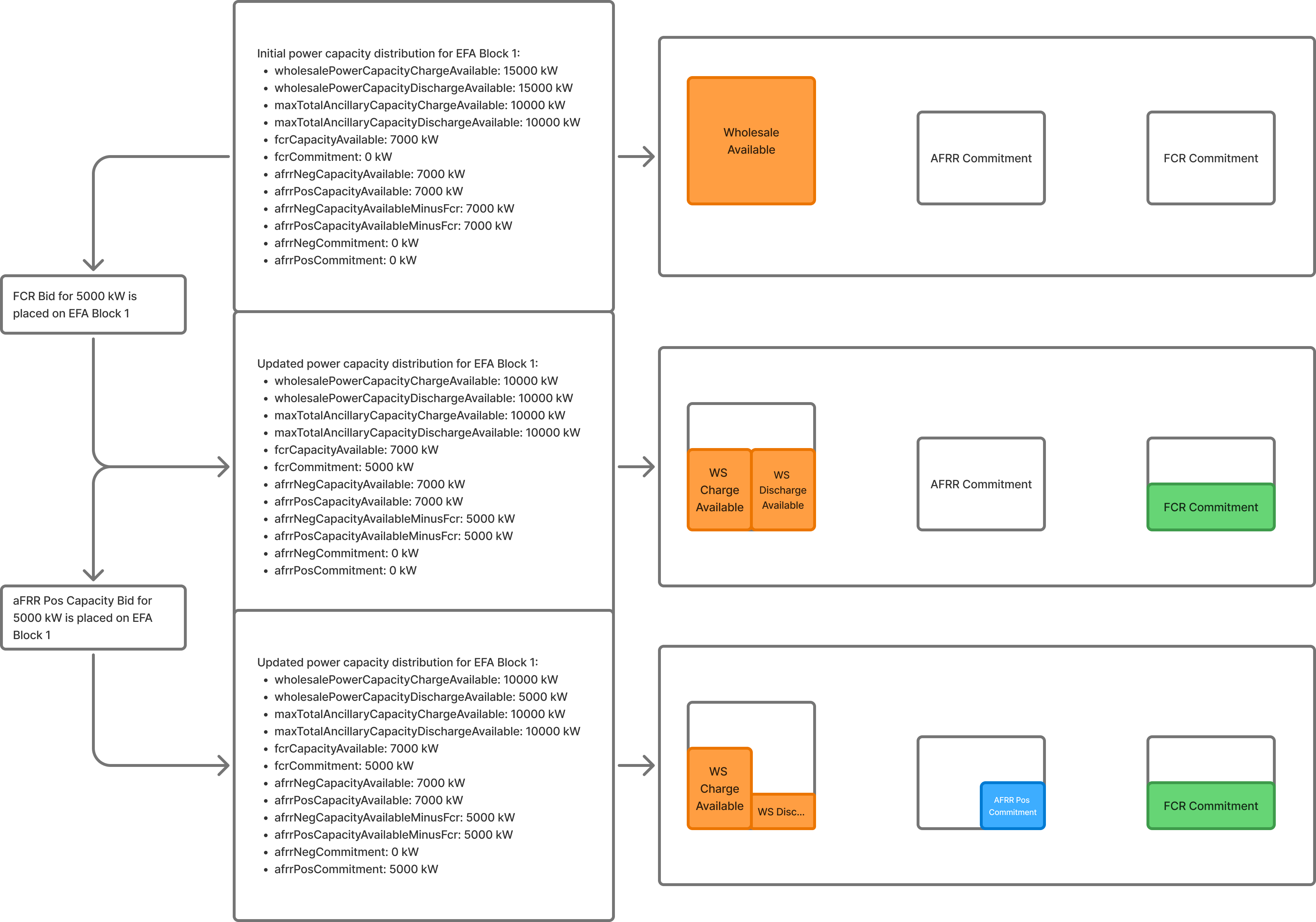
Every time you successfully submit a bid, or a bid receives a result, both the ancillary commitment and the available wholesale capacity on the virtual asset are adjusted.
You can imagine the available wholesale power capacity as a pool from which the ancillary commitments are drained: When you place a bid, the offered capacity is taken from the wholesale “pool” and added to the ancillary commitment. Likewise, if you receive a rejected result, the capacity is taken from the ancillary commitment and added back to the wholesale “pool”.
You can check your ancillary commitments per market through the operational data endpoint on the virtual asset, by requesting the following categories:
fcrCommitmentafrrPosCommitmentafrrNegCommitment
You can check your available wholesale capacity by requesting the following categories:
wholesalePowerCapacityChargeAvailablewholesalePowerCapacityDischargeAvailable
8.1 FCR commitment and wholesale buffer
The FCR commitment at a given point in time is the summed capacity of all FCR bids without results and all accepted FCR results.
If you place a FCR bid, the value of the fcrCommitment timeseries is increased by the offered capacity of the bid.
At the same time, both the wholesalePowerCapacityChargeAvailable and the wholesalePowerCapacityDischargeAvailable timeseries are reduced by the offered capacity of the bid.
Additionally, we validate that after this reduction at least 25% of the committed FCR capacity still remain as available wholesale capacity. This 25% wholesale buffer is enforced due to a legal requirement from the TSO to guarantee the availability of the FCR response in case of unavailabilities. If, after your FCR bid, the buffer would be below 25%, we reject the bid.
To calculate the wholesale buffer do the following calculation:
Example
You want to place a FCR bid for 4000 kW on EFA Block 1.
You query fcrCapacityAvailable and find out you have 5000 kW available during that period.
You query wholesalePowerCapacityChargeAvailable and wholesalePowerCapacityDischargeAvailable and find out you have 7000 kW available for both. After bidding 4000 kW into FCR, you would be left with 3000 kW wholesalePowerCapacityChargeAvailable and wholesalePowerCapacityDischargeAvailable.
You do the following calculation:
In the example, you needed at least 1000 kW available in both directions to allow for a 25% wholesale buffer. Your bid does not violate that legal requirement.
8.2 aFRR Pos commitment
The aFRR Pos commitment at a given point in time combines both aFRR Pos Energy and aFRR Pos Capacity bids and results and is calculated the following way:
To explain:
- aFRR Pos Capacity commitment: The summed offered capacity of all accepted aFRR Pos Capacity results and all aFRR Pos Capacity bids without a result.
- aFRR Pos Energy commitment: The summed offered capacity of all accepted aFRR Pos Energy results and all aFRR Pos Energy bids without a result.
- This calculation ensures we always have enough capacity reserved to fulfil the aFRR Pos Capacity commitment which may be relevant in an emergency fallback scenario.
If you place a aFRRPosCapacity or aFRRPosEnergy bid, the value of the afrrPosCommitment timeseries is increased by the offered capacity of the bid.
At the same time, the value of the wholesalePowerCapacityDischargeAvailable operational data timeseries is reduced by the offered capacity of the bid.
8.3 aFRR Neg commitment
The aFRR Neg commitment at a given point in time combines both aFRR Neg Energy and aFRR Neg Capacity bids and results and is calculated the following way:
To explain:
- aFRR Neg Capacity commitment: The summed offered capacity of all accepted aFRR Neg Capacity results and all aFRR Neg Capacity bids without a result.
- aFRR Neg Energy commitment: The summed offered capacity of all accepted aFRR Neg Energy results and all aFRR Neg Energy bids without a result.
- This calculation ensures we always have enough capacity available to fully deliver the aFRR Neg Capacity commitment which may be relevant in an emergency fallback scenario.
If you place an aFRRNegCapacity or an aFRRNegEnergy bid, the value of the afrrNegCommitment timeseries is increased by the offered capacity of the bid.
At the same time, the value of the wholesalePowerCapacityChargeAvailable operational data timeseries is reduced by the offered capacity of the bid.
9. What is the behaviour during unavailabilities?
If a virtual asset is affected by an unavailability, we may:
- Reduce a result to a lower accepted capacity and adjust the ancillary commitments timeseries accordingly.
- Reject a result that was previously accepted and adjust the ancillary commitments timeseries accordingly.
Notably, reducing or rejecting ancillary bids is always a last resort action: We will first fully reduce the available wholesale power capacity before touching the ancillary bids and results.
To be informed about the state of your ancillary commitments and the available wholesale capacity, make sure to always monitor the following operational data categories:
afrrPosCommitmentafrrNegCommitmentfcrCommitmentwholesalePowerCapacityChargeAvailablewholesalePowerCapacityDischargeAvailable
10. How do I check activation signals?
Bidding into ancillary services is equivalent to offering a certain amount of your available power capacity to the TSO which it can use to balance the grid. This is done via activation signals that are sent by the TSO to a physical asset that has placed a successful ancillary bid. These activation signals have a positive (discharge) or negative (charge) direction as well as a power capacity and must immediately be carried out by the physical asset that receives them.
We will then forward the activation signals to your virtual asset for the bids you have placed.
To check activation signals for the relevant markets, query the following operational data categories:
fcrActivationsafrrPosActivationsafrrNegActivations
11. Bid submission examples
11.1 FCR Bid

11.2 aFRR Pos Capacity bid

11.3 aFRR Neg Capacity bid

11.4 FCR bid and aFRR Pos Capacity bid
Last modified on June 5, 2026

