1. Re-validation process
Categories
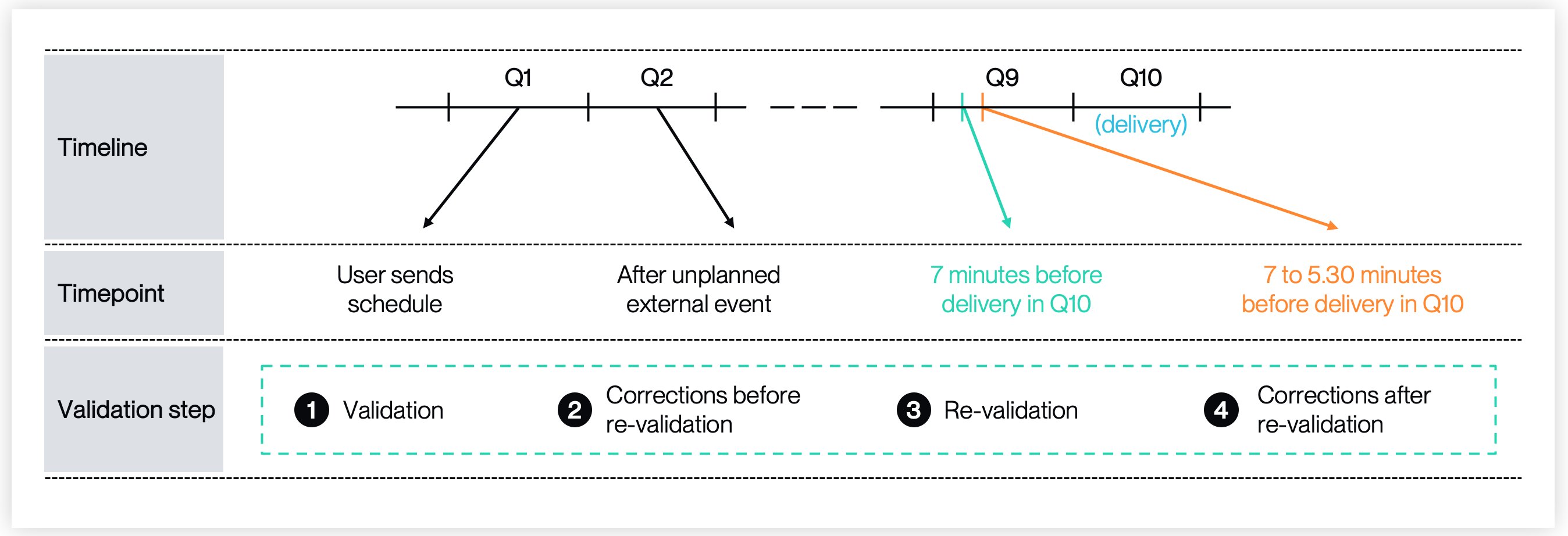
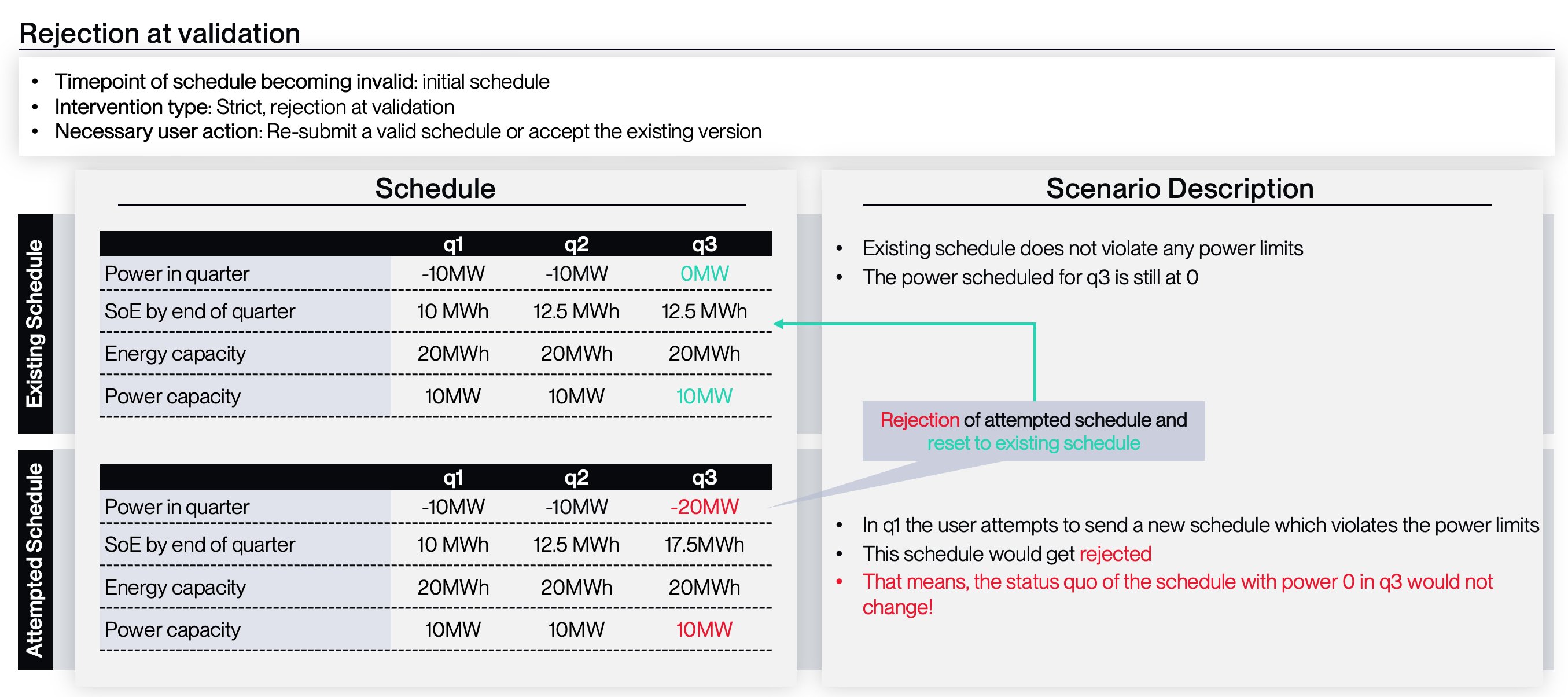
Possible interventions: There are multiple types of interventions at different levels/ points in time. The following part describes how they differ and at which time they are relevant Strict (only apply to power exceeding available power, malformed requests, platform outages and submission after gate-closure)- Validation - rejection on submission = your schedule will be rejected
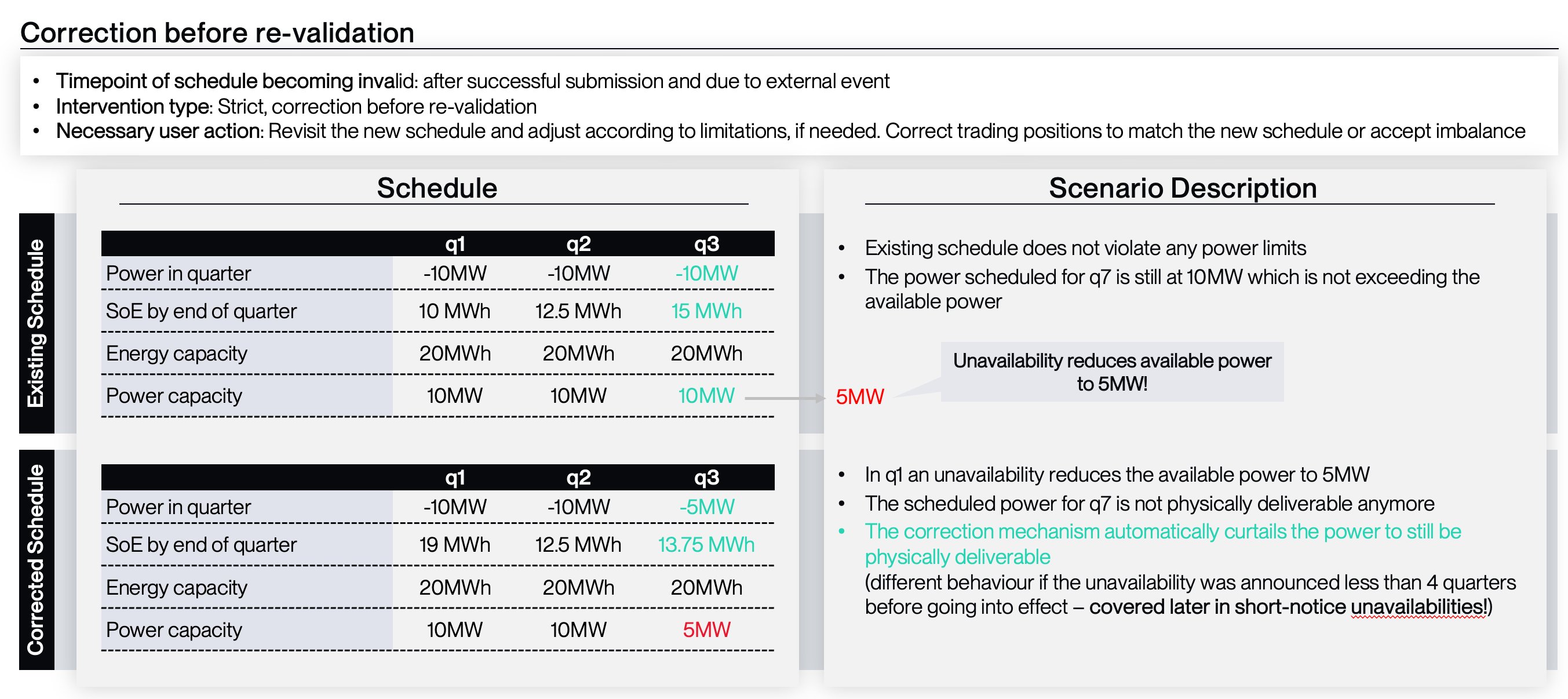
- Correction after submission and before re-validation = your schedule will be corrected before the re-validation (e.g. typically when an unavailability starts to hit)
- Correction on re-validation = your schedule will be corrected, as part of the re-validation 7 minute before delivery (e.g. typically when your schedule would lead to out of bounds SoC levels but the scheduled power is in the acceptable range)
- Rejection if submitted after re-validation = even soft criteria, which would only lead to a correction as part of the re-validation, turn into hard criteria and therefore a rejected schedule, once the re-validation and correction has taken place


Validation process
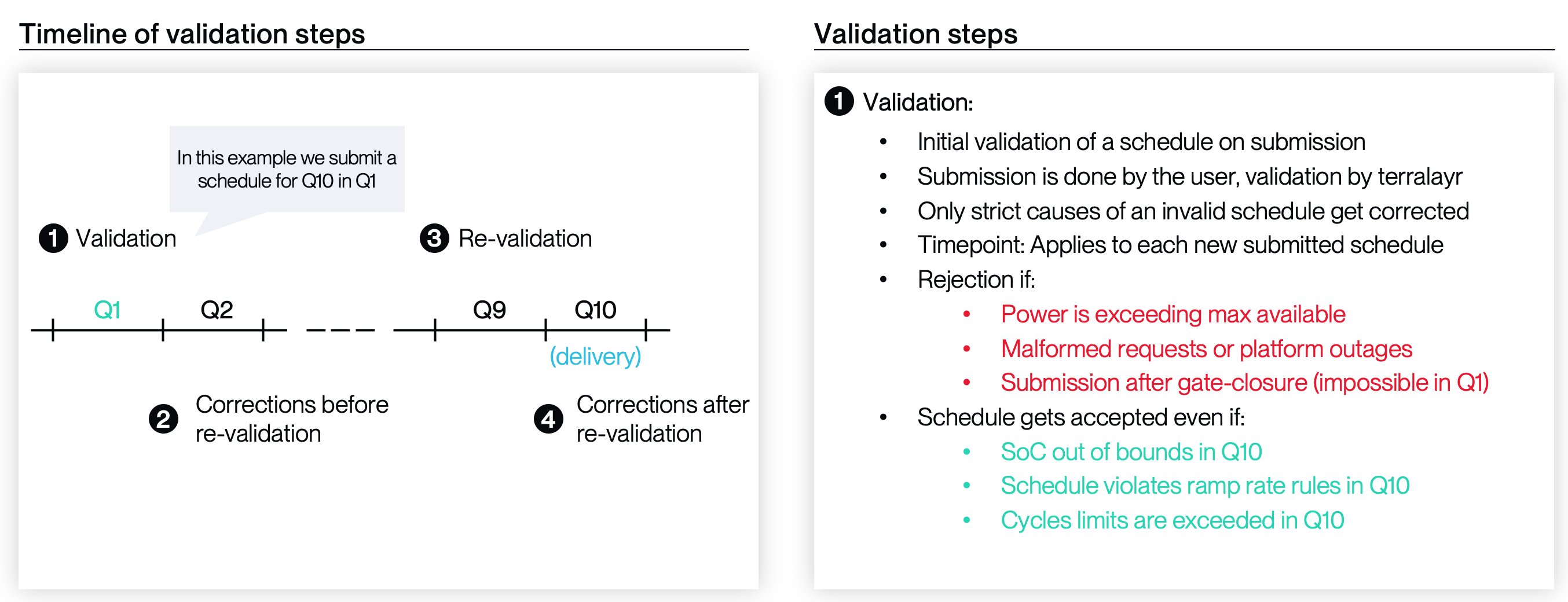
1. Validation (strict)
- Every schedule is validated against a strict set of rules
- If these strict rules are not adhered to, the schedule is rejected

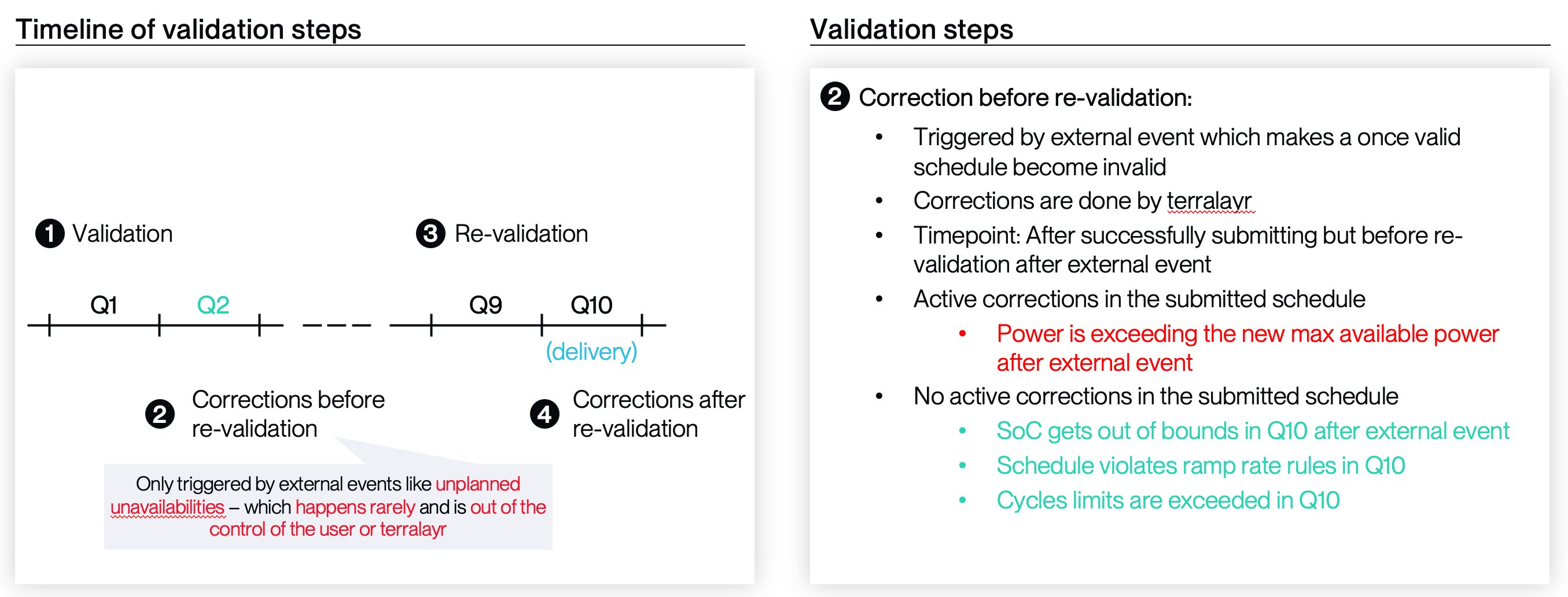
2. Correction after submission and before re-validation (soft)
- After successful submission, a sucessfully accepted schedule can still become invalid in a way, that it would not have surpassed the original validation
- That can happen as a consequence of external events such as unavailabilities
- In such cases, terralayr intervenes through a schedule correction before the re-validation

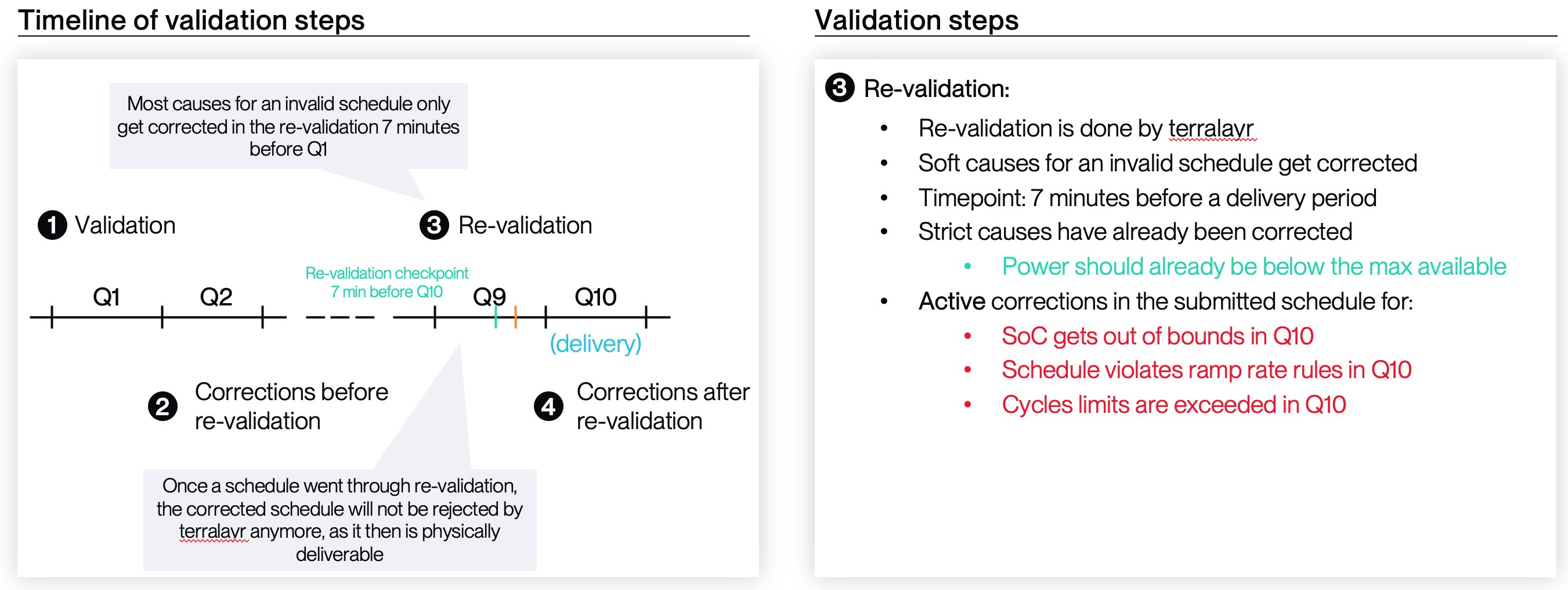
3. Re-validation and correction (at 7min before delivery start) (soft)
Re-Validation Process At 7 minutes before delivery, the Dispatch Schedule is finally re-validated against a list of criteria such as physical deliverability or contractually agreed limitations of battery usage. You can find a list of the validation parameters in your contract Annex. Re-Validation results and subsequent actions- The result of your re-validation will either be positive or negative
- “positive” result
- your schedule and trading can proceed as normally
- “negative” result
- If the dispatch leads to a negative re-validation response, it will be corrected slightly until it no longer violates the set respective rule(s) → it will be corrected in the most minimal way possible, which makes sure the rules are adhered to again
- “positive” result
- If your schedule leads to a negative re-validation result, because it violated one of the reasons for invalid schedules , terralayr will slightly correct it
- terralayr will take minimal corrective measures on the following 15 minute period schedule value to ensure feasibility, avoiding over-correction.
- Summed up, terralayr is replacing an infeasible dispatch schedule value of the next 15min period with an adjusted dispatch schedule value that applies minimal corrections.
- The “corrected” dispatch schedule will become the new Active Schedule, readable via API
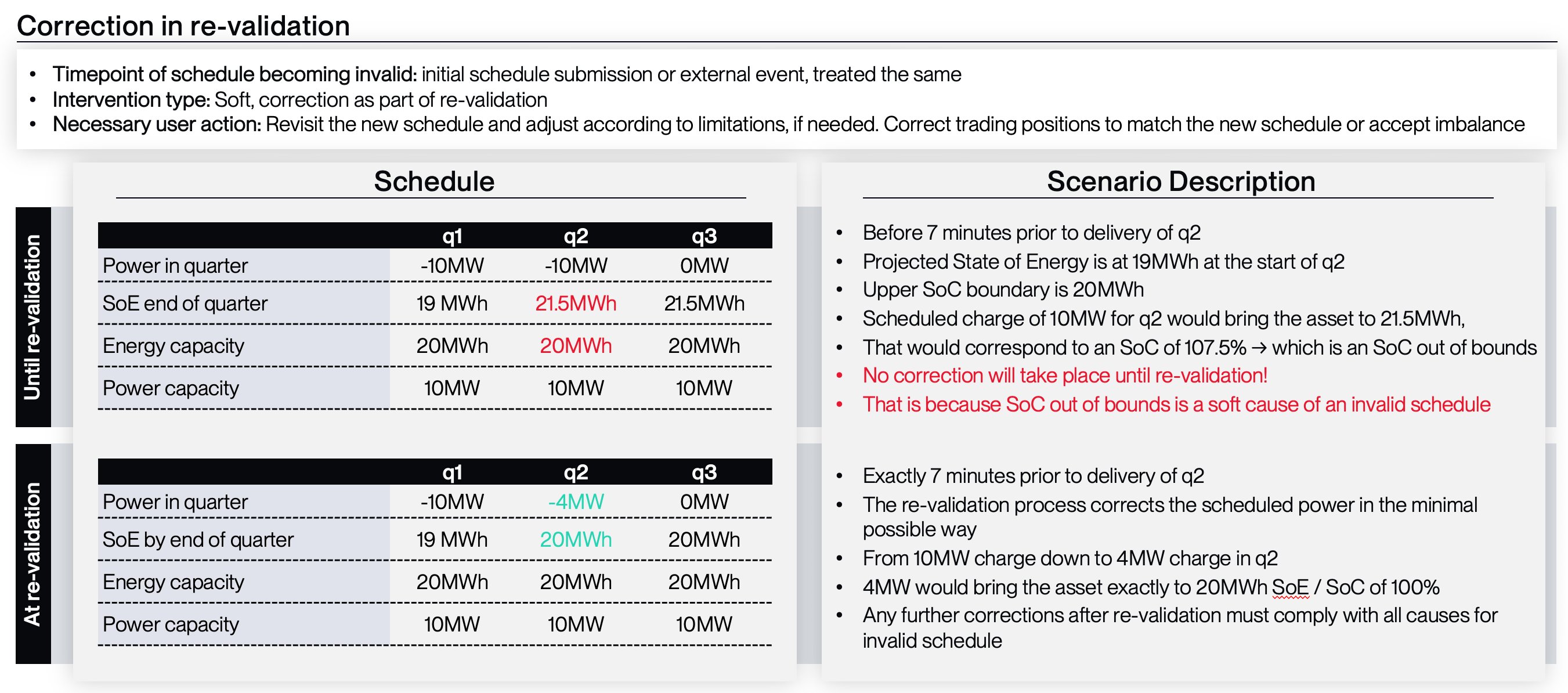
- Example:
- we are in q1 and it is 7 minute prior to delivery of q2
- Your projected State of Energy is at 19MWh at the start of q2
- Your upper SoC boundary is 100% with a maximum State of Energy available of 20MWh
- You scheduled a charge of 10MW for q2
- That scheduled charge would bring the asset to 21.5MWh, which would correspond to an SoC of 107.5% → which is above the SoC limit of 100%
- The re-validation process would recognise that the schedule would lead to an SoC above the upper SoC boundary and correct the scheduled power in the minimal possible way: from 10MW charge down to 4MW charge over in q2
- 4MW would bring the asset exactly to 20MWh SoE and thereby to the upper SoC boundary of 100%

- Option: no active position closing
- terralayr corrects the schedule in the most minimal way possible
- the customer can access information on the corrected schedule via API
- terralayr nominates (and customer counter-nominates) that corrected schedule
- the customer has two options
- close trading positions to make them align with the corrected, nominated schedule, and avoid imbalance
- leave the schedule as it is, but face an imbalance between terralayr’s nominations and the trading positions Example:
- picking up the example from above, your schedule has been corrected from 10MW to 4MW
- we are 7 minute before delivery and your algo just receives feedback from our API that a schedule correction has taken place and that terralayr will nominate 4MW charge for q2
- now you could either correct your trading positions from 10MW to 4MW or you could accept the imbalance
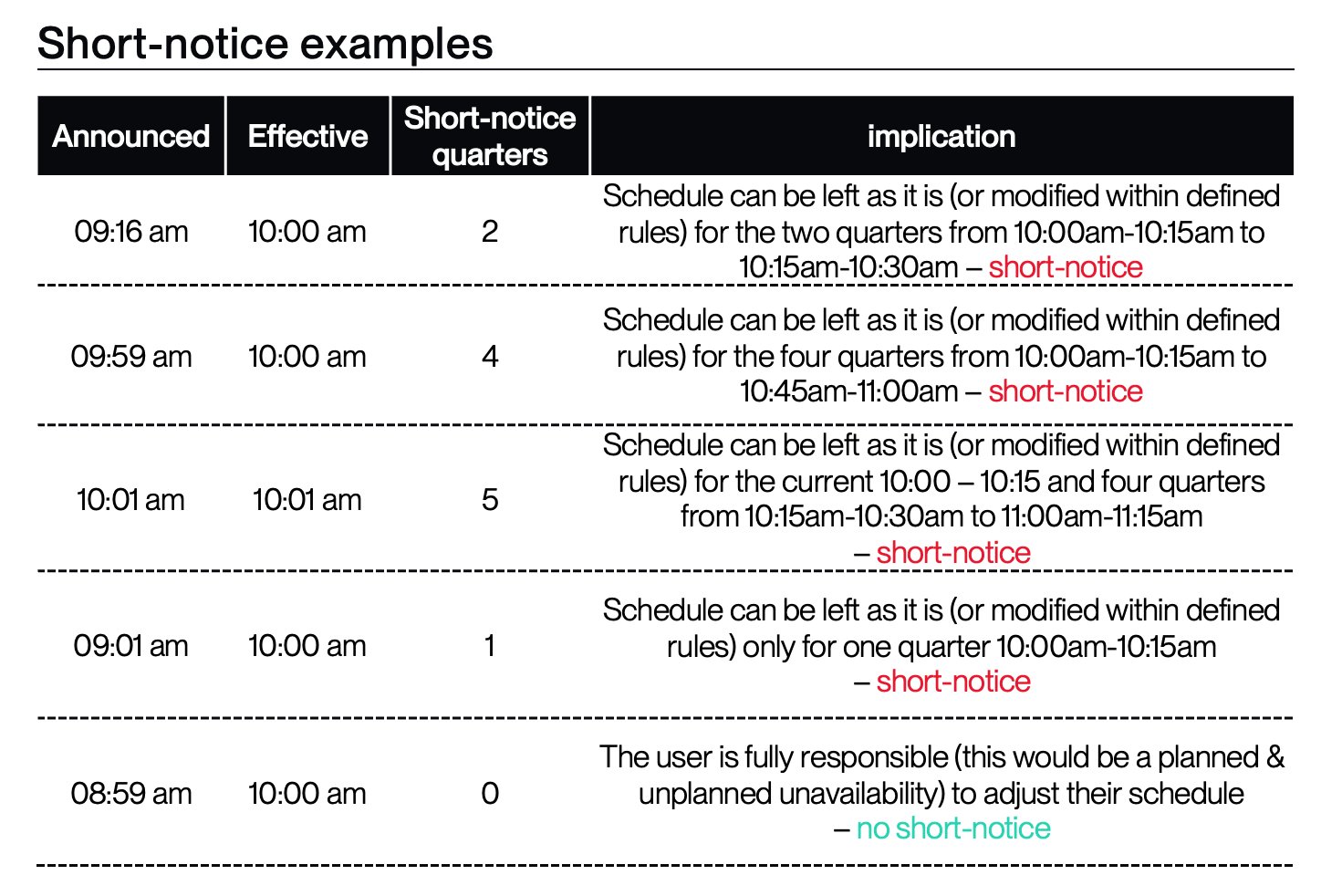
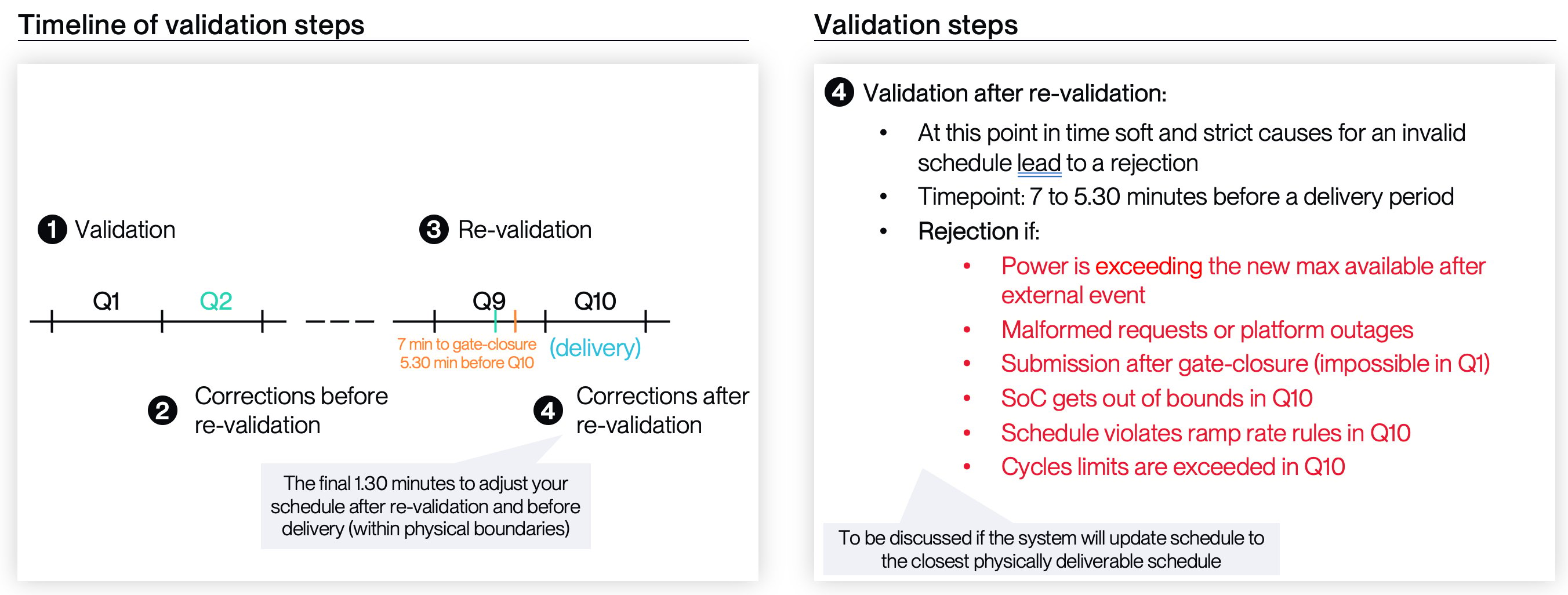
4. Adjustments after schedule validation (Later than 7min before delivery start but before gate-closure) - (strict)
- After the 7 minute mark has surpassed, the once “soft” validation (> 7min) turn into a “hard” validation, based on the same criteria as within the 7min validation, to maintain flexibility to update dispatch schedules, without losing their correctness as validated at 7min, part. regarding hard A.S. boundaries. A schedule which does not adhere to the validation criteria later than 7minutes before delivery (i.e. after the re-validation and correction) will be rejected.

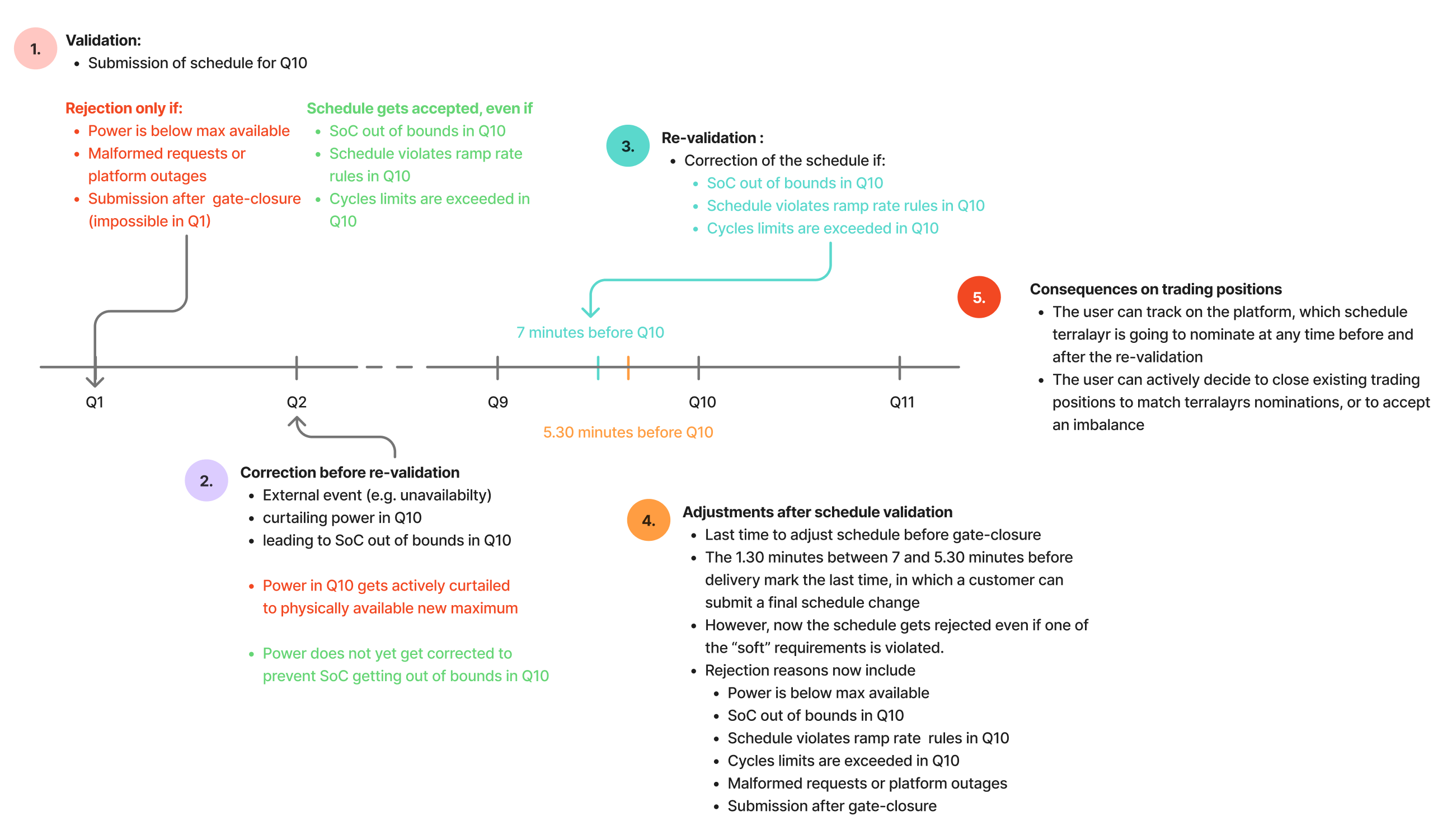
Exemplary timeline of re-validation, correction and adjustments after schedule validation
- This visual of the timeline set out above already includes most of the reasons for invalid schedules

2. Majority of reasons for invalid schedules
List of reasons:| Reason | Description | Consequence | 1. validation and rejection on submission | 2. intervention before re-validation (earlier than 7 minutes before delivery) | 3. correction on re-validation [coming Q4 2025] (7 minutes before delivery) | 4. rejection if submitted after re-validation | Error message in Q3 2025 (if applicable) | Outlook to error message in Q4 2025 (if applicable) | Necessary user action |
|---|---|---|---|---|---|---|---|---|---|
| |Scheduled Power| > |Max Power available| - in the attempt to submit a schedule | If your attempted schedule involves power which is higher magnitude (be it discharge or charge) than your maximum available power | Status Q32025 Schedule rejectionYou have to send a new adjusted schedule which is satisfying conditions | yes | already corrected | already corrected | yes | 400 + text string explanation | 400 + enumerated error code and more detailed explanation | Resubmit a valid schedule |
| |Scheduled Power| > |Max Power available| - after successfully submitting a schedule and an external event occurring | If your formerly accepted schedule involves power which is higher magnitude (be it discharge or charge) than your new maximum available power e.g. unavailability | Status Q32025 Always active correction: Your power is corrected to the level of max power available | no (as you already submitted in the past) | yes | already corrected | yes | no error message, just correction | [optional] notification which warns about schedule adjustment | Revisit the new schedule and adjust according to limitations, if needed. Correct trading positions to match the new schedule or accept imbalance |
| Schedule Power violates ramp rate rules in the attempt to submit a schedule | If your attempted schedule involves power which is violating the pre-set ramp rate rule framework | Status Q32025 - No active correction: Your responsibility to make sure your schedule respects ramp rate restrictions Status Q42025 - Active correction as part of re-validation: Your schedule is accepted, and validated 7 minutes prior to delivery and the power value for the next delivery period is corrected, if it would violate ramp rate restrictions | no | no | yes | yes | no error message, just correction | [optional] notification which warns about schedule adjustment | Revisit the new schedule and adjust according to limitations, if needed. Correct trading positions to match the new schedule or accept imbalance |
| Scheduled SoC < Lower SoC boundary OR Scheduled SoC > Upper SoC boundary at a time - in the attempt to submit a schedule. | If your attempted schedule involves bringing the SoC to a level which is above the upper SoC boundary or below the lower SoC boundary | Status Q32025 - No active correction: Your responsibility to make sure your schedule respects SoC bounds Status Q42025 - Active correction as part of re-validation: Your schedule validated 7 minutes prior to delivery and the power value for the next delivery period is corrected, if it would lead to SoC getting out of bounds | no | no | yes | yes | no error message, just correction | [optional] notification which warns about schedule adjustment | Revisit the new schedule and adjust according to limitations, if needed. Correct trading positions to match the new schedule or accept imbalance |
| Scheduled SoC < Lower SoC boundary OR Scheduled SoC > Upper SoC boundary at a time - after successfully submitting a schedule and an external event occurring. | if your scheduled power brings the SoC to a level which is above the upper SoC boundary or below the lower SoC boundary e.g. an unavailability reduces your max power and SoE available for a certain time period. That leads to your SoC going below 0% at a later point, where the unavailability is lifted again. | Status Q32025 - No active correction: Your responsibility to make sure your schedule respects SoC bounds Status Q42025 - Active correction as part of re-validation: Your schedule validated 7 minutes prior to delivery and the power value for the next delivery period is corrected, if it would lead to SoC getting out of bounds | no (as you already submitted in the past) | no | yes | yes | no error message, just correction | [optional] notification which warns about schedule adjustment | Revisit the new schedule and adjust according to limitations, if needed. Correct trading positions to match the new schedule or accept imbalance |
| Submission after gate-closure | if you submit your schedule after gate closure time, that will lead to a negative validation | Always schedule rejection: Your schedule will be rejected | yes | - | - | yes | 400 + text string explanation | 400 + enumerated error code and more detailed explanation | Adjust trading positions positions if still possible and if necessary |
| Exceeding cycle limits | Your schedule leads to an excess of cycle limits within the period of your virtual battery. That might be a daily or yearly basis. | Correction is your responsibility: you will get negative validation feedback but there will be no active intervention. you still need to adjust your schedule yourself! | no | no | yes | yes | no error message, just correction | [optional] notification which warns about schedule adjustment | Revisit the new schedule and adjust according to limitations, if needed. Correct trading positions to match the new schedule or accept imbalance |
| Malformed request | The intended action does not make sense. E.g. Formal errors (misspellings etc.) or other ways of wrong API usage | Your schedule cannot be submitted and you have to check for the root cause | yes | - | - | yes | 4XX error | 4XX error | Resubmit a valid request |
| Error on the terralayr platform | A platform outage occurs | Outtage on the platform → retry mechanism, try again what you have done → if still no acceptance, you should reach out to terralayr operations Any imbalance resulting is terralayr’s responsibility | Normally | - | - | - | 5XX error | 5XX error | Retry mechanism to figure out if there is really a platform issue Reach out to terralayr support: support@trlyr.com |
3. Error Response
Current error string
At the moment the complete JSON response in an error state looks like:Error Categories
For most of errors the error text reads"<category> error: <description>"
The error categories at the moment are:
- auth: the request failed authentication and/or authorisation - maps to 401 or 404 response
- not found: the request was valid, but the requested object doesn’t exist - maps to 404 response
- invalid operation: the request makes sense and the resources exist, but it fails some validation such as power limits - maps to 400 response
- forbidden operation: the request is otherwise illegal by our business logic - maps to 403 response
- error on the platform: a platform outage in some kind of shape occurred - maps to a 5XX response
- Not all of these error texts are shown in full to the user, usually for data-protection reasons such as not showing the details of an authorisation failure if customer A tried to do something with a customer B resource. For most of those, the customer will just get an empty response with a 404 or 500 code as appropriate.
- There are some ways to get an error that do not follow this pattern. Usually these are generic HTTP failures, such as:
if you have an invalid body.
- Other standard HTTP errors may apply, which should all be in the 4XX range when they amount to user error such as a malformed request, or the 5XX range when they amount to platform outages.
Terralayr specific validation errors
These are errors that happen when a request fails some kind of validation specific to the terralayr platform, usually amounting to an attempt to do something with a virtual-asset that does not make sense or is otherwise against the rules. They all fall into the categories of invalid or forbidden operation errors. As such, the JSON response follows the pattern above, and the HTTP code is usually 400 or 403. Examples:- ErrPowerPointStartTimeIsNotAQuarterOfAnHour, “instruction start time must be a quarter of an hour” → the user has sent a schedule update not aligned to the 15 minute grid.
- ErrCannotUpdatePowerPointPastGateClosure, “cannot update instruction after gate closure” → the user has tried to send a schedule after gate closure.
- ErrCannotUpdateNonWholesaleBlock, “cannot update schedule of non wholesale block: <block ID>” → the user has tried to schedule wholesale power on an ancillary block.
- ErrCannotUpdateBlockOutsideOfBlockTimespan, “cannot update block outside of its timespan: update timespan <update timespam> is not fully contained within block timespan <block timespan>”: → the user sends schedule points outside the lifetime of their virtual-asset
Outlook
The current error responses just provide a string indicating what went wrong. As the API is developed we may look to add more structured information to these responses to allow clients to take programmatic action to address the issue.4. Examples
- Example: SoC out of bounds

- Example: Power limits exceeded – initial submission

- Example: Power limits exceeded – external event

5. Details and footnotes
SoC projections
The SoC projection is calculated based on the following parameters:- Defined round-trip efficiencies for charging and discharging
- The lastest SoC including FCR and aFRR activations
- For SoC-forwarding activated virtual batteries, any corrections from the latest SoC reading.
Calculation of SoC projection - part of re-validation
- At 7 minutes before delivery, the SoC projection of the next 15min period is validated against the given lower and upper SoC bounds.
- If the SoC at the end of the following 15min period is projected to be below the lower SoC bound, the following correction is applied, with t being the following 15min period:
- If the SoC at the end of the following 15min period is projected to be above the upper SoC bound, the following correction is applied, with t being the following 15min period: