> ## Documentation Index
> Fetch the complete documentation index at: https://docs.trlyr.com/llms.txt
> Use this file to discover all available pages before exploring further.
# Asset owner platform onboarding
> An overview of the terralayr platform for asset owners: Connect, Control, and Ledger.
# Introduction
terralayr offers a comprehensive energy asset management platform that provides real-time monitoring, control, and financial tracking for your energy assets. Our modular solution consists of multiple components: Connect, Control, and Ledger. Connect delivers real-time data visualization of your energy assets' performance metrics, Control enables precise execution of dispatch schedules and market participation, and Ledger provides transparent revenue tracking and financial benchmarking to ensure optimal returns on your investments.
# Connect
terralayr's connect module provides a comprehensive IoT footprint directly on your energy assets, delivering real-time streaming data that gives you complete visibility into asset behaviors and performance metrics at any moment.
## **Standard operational data**
The screenshot below shows the operational real time data of a physical asset over a day. Specifically datapoints included are
* **State of Charge** → the state of charge measured on the physical asset in real time
* **Power** → this includes the active power but also the available power
* **Available Energy Capacity** → available Energy Capacity per system module (in the case below, the battery has three system modules)
* **Battery temperature** → battery temperature data which is also avaialable per system module (in the case below, the battery has three system modules)
* **Battery Health** → How much of the nameplate Energy capacity is still available
* **Battery Cycles** → Sum of Discharge / total Energy capacity
* **Redispatch** → if your battery is or has been subject to redispatch, this is shown on the operational dashboard and the data is stored and made available to you

 ## Ancillary operational data
If your asset is pre-qualified for ancillary services, there are some additional metrics which you can observe in real time on the LAYR
* **Traded FCR** → timeseries of real time FCR activations
* **aFRR Dispatch** → timeseries of your accepted aFRR bids and real time activations
* **Frequency** → timeseries data of the grid frequency measured at your systems metering point
## Ancillary operational data
If your asset is pre-qualified for ancillary services, there are some additional metrics which you can observe in real time on the LAYR
* **Traded FCR** → timeseries of real time FCR activations
* **aFRR Dispatch** → timeseries of your accepted aFRR bids and real time activations
* **Frequency** → timeseries data of the grid frequency measured at your systems metering point
 # Control
terralayr's Control module seamlessly builds upon the Connect infrastructure to enable precise execution of dispatch schedules and ancillary activations on your energy assets. This powerful feature delivers real-time, robust, and secure asset dispatch, allowing you to manage wholesale schedules and take advantage of ancillary market opportunities with complete confidence.
## Wholesale schedule and asset control
* Logging of dispatch schedules on a virtual asset possible via front-end or via automated API connection
→ enabling seamless integration with trading system
* Direct control of portfolio of physical assets behind the virtual asset through the logged schedule → smart load distribution of aggregated assets behind the virtual asset (also possible to just connect one single asset to the virtual asset)
**Example**
* Dispatch schedule on the left
* Visualisation of power from the dispatch schedule on top right
* State of Energy over time in the bottom right
# Control
terralayr's Control module seamlessly builds upon the Connect infrastructure to enable precise execution of dispatch schedules and ancillary activations on your energy assets. This powerful feature delivers real-time, robust, and secure asset dispatch, allowing you to manage wholesale schedules and take advantage of ancillary market opportunities with complete confidence.
## Wholesale schedule and asset control
* Logging of dispatch schedules on a virtual asset possible via front-end or via automated API connection
→ enabling seamless integration with trading system
* Direct control of portfolio of physical assets behind the virtual asset through the logged schedule → smart load distribution of aggregated assets behind the virtual asset (also possible to just connect one single asset to the virtual asset)
**Example**
* Dispatch schedule on the left
* Visualisation of power from the dispatch schedule on top right
* State of Energy over time in the bottom right
 ## Ancillary market control
* Submitting bids for ancillary markets for a virtual asset possible via front-end or via automated API connection
→ enabling seamless integration with trading system
* Overview and monitoring of accepted capacity and respective prices via frontend or via automated API connection
→ including FCR, aFRR capacity and aFRR energy markets
* Accepted bids autmoatically reduce the available wholesale capacity in the wholesale schedule and asset control interface → make sure the legal obligations of ancillary market participation are met and not capacity can be use “double”
**Example**
* Overview of Ancillary service day ahead bidding interface on the left of screenshot one
→ this includes FCR and aFRR capacity markets
→ accepted bids would also be displayed here
## Ancillary market control
* Submitting bids for ancillary markets for a virtual asset possible via front-end or via automated API connection
→ enabling seamless integration with trading system
* Overview and monitoring of accepted capacity and respective prices via frontend or via automated API connection
→ including FCR, aFRR capacity and aFRR energy markets
* Accepted bids autmoatically reduce the available wholesale capacity in the wholesale schedule and asset control interface → make sure the legal obligations of ancillary market participation are met and not capacity can be use “double”
**Example**
* Overview of Ancillary service day ahead bidding interface on the left of screenshot one
→ this includes FCR and aFRR capacity markets
→ accepted bids would also be displayed here
 * Overview of Ancillary service intraday bidding interface in the second screenshot → this covers aFRR energy markets → accepted bids would also be displayed here
 ## Full availability management toolkit
* Flexible logging and planning of unavailabilities via front-end → this data can always be accessed backwards looking and can serve as a safely stored log of asset availability over operating time
* Automatic reduction of available power and energy capacity on the virtual asset → automatically forwarded reductions on virtual assets lead to an end to end fully automated adaption of trading algorithms which consume the virtual asset availability via API, assuring minimisation of imbalance costs and rapid adjustments of open market positions
## Full availability management toolkit
* Flexible logging and planning of unavailabilities via front-end → this data can always be accessed backwards looking and can serve as a safely stored log of asset availability over operating time
* Automatic reduction of available power and energy capacity on the virtual asset → automatically forwarded reductions on virtual assets lead to an end to end fully automated adaption of trading algorithms which consume the virtual asset availability via API, assuring minimisation of imbalance costs and rapid adjustments of open market positions

 # Ledger
terralayr's Ledger module provides a transparent breakdown of revenue generated by your energy assets, allowing you to view earnings at daily granularity separated by market type and compare performance against custom financial benchmarks to ensure your Internal Rate of Return (IRR) remains on track throughout the asset's lifetime.
* timeseries data of total revenues and split between markets such as wholesale, aFRR energy, aFRR capacity and FCR
* ability to include internal benchmark trends to track whether financial performance of an asset is on track
* timeseries data on total energy consumption and revenue per energy market as well as auxiliary power consumption
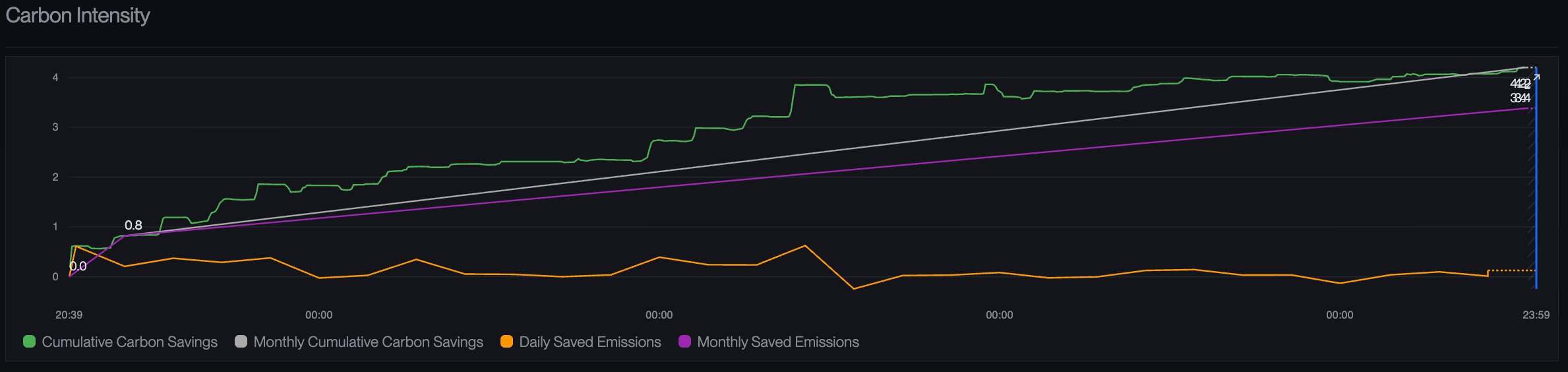
* timeseries data of Carbon intensity savings for usage in ESG reportings
## **Example for a 1h asset**
# Ledger
terralayr's Ledger module provides a transparent breakdown of revenue generated by your energy assets, allowing you to view earnings at daily granularity separated by market type and compare performance against custom financial benchmarks to ensure your Internal Rate of Return (IRR) remains on track throughout the asset's lifetime.
* timeseries data of total revenues and split between markets such as wholesale, aFRR energy, aFRR capacity and FCR
* ability to include internal benchmark trends to track whether financial performance of an asset is on track
* timeseries data on total energy consumption and revenue per energy market as well as auxiliary power consumption
* timeseries data of Carbon intensity savings for usage in ESG reportings
## **Example for a 1h asset**